

Title
ChatGPT’s Massive March 2026 Update: Meet GPT-5.4 and Interactive Learning!
Introduction
Welcome back to another AI Tutorial, my friends! If you log into ChatGPT today, you might notice things feel a little... different. And honestly, much, much smarter. Grab your favorite drink and get comfortable, because March 2026 has brought some of the most mind-blowing, workflow-changing updates we have ever seen from OpenAI.

This month, OpenAI didn't just tweak a few buttons; they completely overhauled the engine. From retiring the models we just got used to, to introducing a brand-new way to interact with math and science visually, the platform has seriously leveled up. Let's break down exactly how to use these new features, what makes them so special, and why they will completely change your daily workflow as of today!
Goodbye GPT-5.2, Hello GPT-5.4 Thinking!
First things first: if you are looking for GPT-4o, GPT-4.1, or even the recently popular GPT-5.2, they are officially gone! As of February 13, 2026, OpenAI retired those models from the main ChatGPT interface to make way for the next generation.
But don't panic! They have been replaced by something much better. The new default for everyone is GPT-5.3 Instant, which is an incredibly fast workhorse that retains a warm, conversational tone. However, the absolute star of the show is GPT-5.4 Thinking, which just launched on March 5, 2026.
What makes it special
GPT-5.4 is OpenAI's most capable reasoning model to date, designed specifically for difficult, real-world work like polished frontend coding, hard math, and deep web research.
How to use it like a pro
When you select GPT-5.4 Thinking, it will now show you a short "preamble" or thinking plan before it starts generating your final answer. The coolest part? You can actually interrupt the AI while it is thinking! If you see its plan going in the wrong direction, you can add instructions mid-course to adjust its trajectory without losing any of your progress.
Interactive Learning Modules for Math & Science
If you use ChatGPT for studying, analyzing data, or teaching, this new feature—released just yesterday on March 10, 2026—is going to blow your mind. ChatGPT no longer just gives you a boring wall of text for complex subjects; it now gives you fully interactive visual modules.
What makes it special
This feature turns abstract concepts into playgrounds. You can adjust inputs and manipulate equations to instantly see how changes affect graphs and outcomes in real-time. It launched with support for over 70 math and science topics.
How to use it
Simply type a prompt like, "Help me understand the Pythagorean theorem," or "Explain how PV = nRT works". ChatGPT will automatically generate a custom UI right inside the chat window where you can slide variables around and visually explore the problem.
Instant Personalization Across All Chats
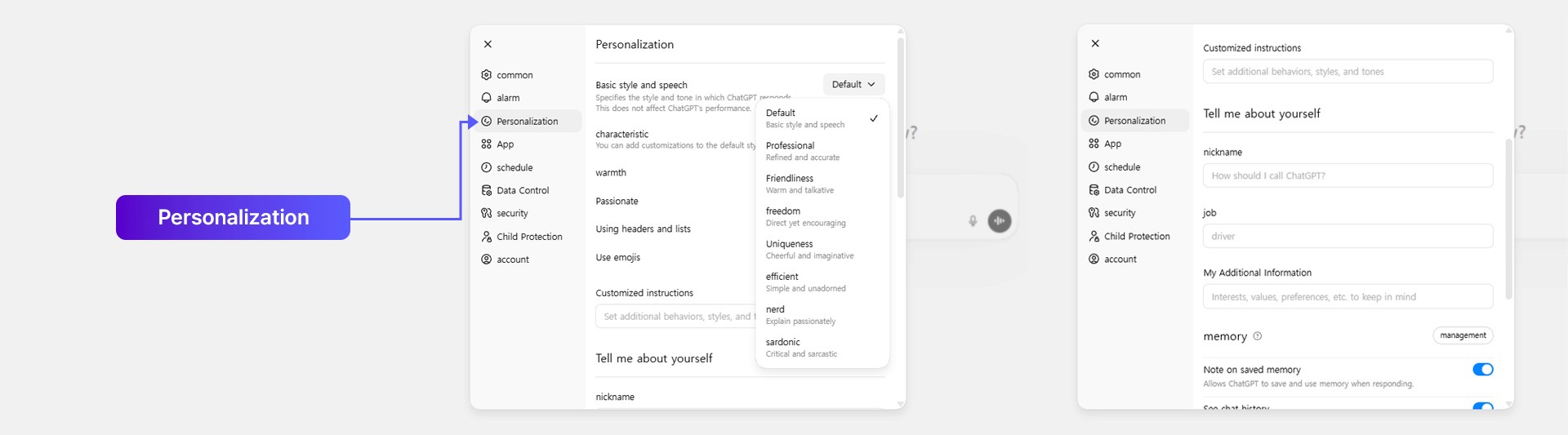
We all know the struggle of updating our "Custom Instructions" or tweaking ChatGPT's personality, only to realize we have to start a brand-new chat for those new rules to actually take effect. Well, as of March 10, 2026, that annoyance is finally history.
What makes it special
Your AI assistant's brain now updates everywhere at once, keeping your experience perfectly consistent without forcing you to abandon your ongoing workflows.
How to use it
Head over to your account menu and click on Settings → Personalization. Any changes you make here are now applied immediately across all of your chats, including your old, existing conversation threads.
Final Thoughts
The AI landscape is moving at lightning speed, and OpenAI is making sure ChatGPT remains your ultimate digital sidekick. Whether you are using the interactive sliders to learn a new concept or interrupting GPT-5.4 mid-thought to perfectly steer your coding project, these new tools give you unprecedented control.
Log in today, switch over to the new models, and try out these interactive features for yourself. Happy prompting, and I will see you in the next tutorial!