A2SET AI Agent Chatbot Pro for WordPress
Product Type & Category
AI AGENT TOOLS
Artificial Intelligence (AI) Software
Tags
agent, chatbot, hybrid, plugin, wordpress
Description
AI Agent Chatbot Pro for WordPress
A premium FAQ first AI support plugin for WordPress, built for website owners who want more control than a basic chatbot.
This plugin combines rule based automation, AI powered replies, and human handoff tools inside one WordPress support workflow. It is designed for websites that want to answer common questions faster, reduce repetitive support work, and still move sensitive cases to a real person when needed.
Instead of relying on AI for everything, this plugin starts with predefined FAQ answers and rule based replies before calling the AI provider. That makes it more practical for policy questions, common support topics, and repeat customer requests where consistency matters.
When AI is needed, the plugin can use your own OpenAI or Gemini API key. It also includes a built in admin inbox where your team can review threads, assign conversations, update statuses, add internal notes, review attachments, and reply manually inside WordPress.
This version also includes optional WooCommerce order lookup context and a Shopify order lookup scaffold for stores that need more support context inside chat flows. Multilingual responses can also be configured through the selected AI model, making it useful for global websites handling customer questions in different languages.
Why It Stands Out
FAQ First Support Flow
Predefined FAQ answers are checked before AI is called, helping reduce unnecessary API usage and keeping common answers more consistent.Rule Based Auto Replies
Set keyword based responses for repetitive support scenarios such as business hours, refund guidance, and basic policy questions.OpenAI or Gemini Support
Use your own API key and switch between supported AI providers based on your workflow.Hybrid AI and Human Support
Routine questions can be handled automatically while sensitive cases can be moved into a human review flow.Built In WordPress Inbox
Manage conversations directly inside WordPress without needing a separate chat dashboard.Agent Assignment and Status Control
Assign threads to staff members and track conversations with statuses such as open, needs reply, human requested, human assigned, and closed.Attachments and Internal Notes
Visitors can send files through the widget, and staff can review attachments and save private team notes inside the inbox.Order Context Support
Optional WooCommerce order lookup is included, and Shopify order lookup scaffolding is available for stores that want to expand support context.Multilingual Support Ready
The bot can answer in the visitor’s language when configured with a compatible multilingual AI model.
Kit Details
WordPress plugin zip file
Main plugin PHP file
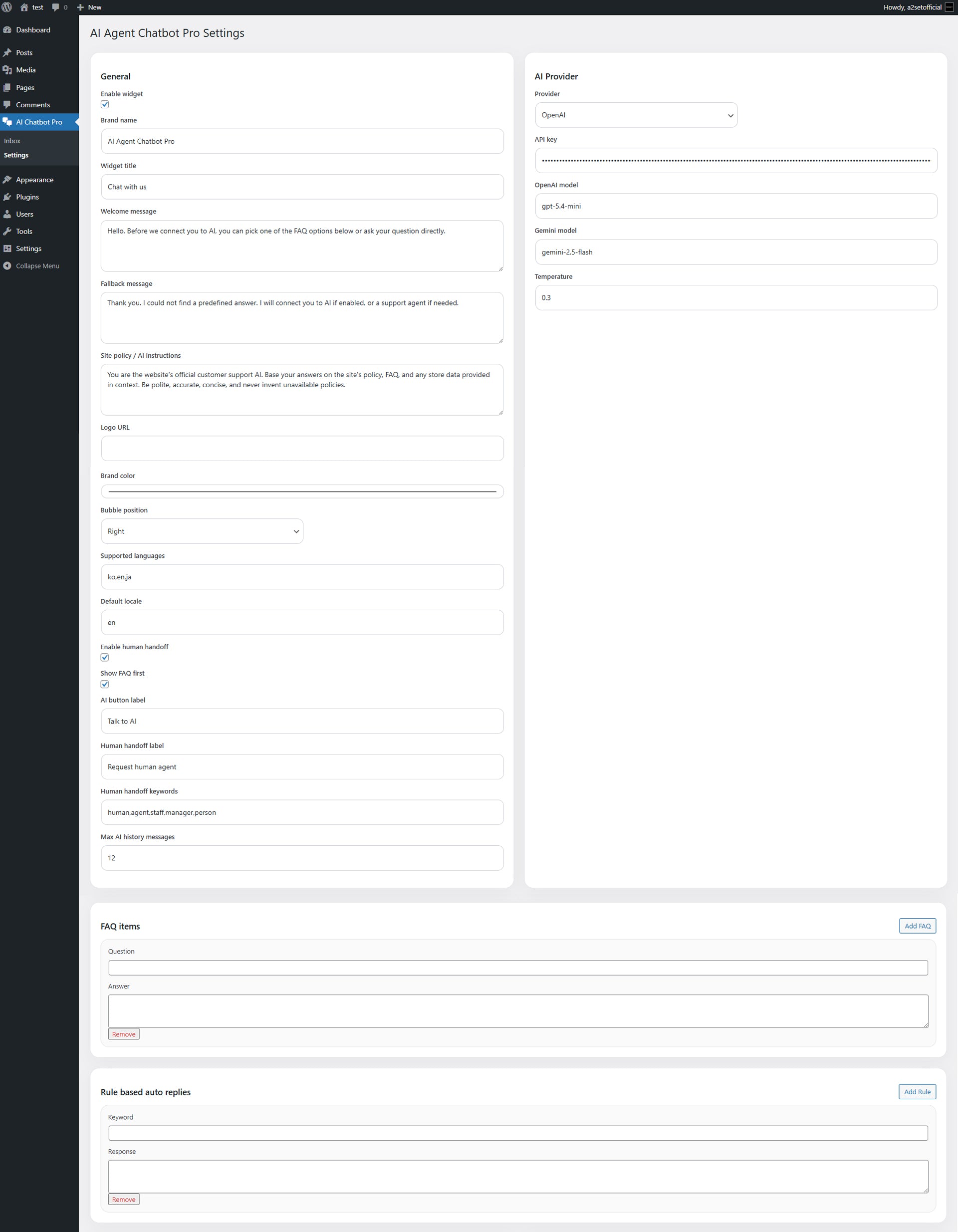
Admin settings page
Built in WordPress inbox
Thread and message database storage
Front end chat widget JavaScript
Front end chat widget CSS
Admin inbox JavaScript and CSS
Shortcode support
Footer widget rendering
FAQ item manager
Rule based auto reply manager
OpenAI provider support
Gemini provider support
Human handoff keyword handling
Agent assignment tools
Status filters and session search
Unread and needs reply tracking
Attachment upload support
Internal team notes
Optional browser alerts
WooCommerce order lookup toggle
Shopify order lookup scaffold settings
Uninstall file not included in this package version
Best For
WordPress websites
Digital product stores
Customer support pages
Small business websites
Creator and service websites
WooCommerce based support workflows
Teams that want AI first response with manual takeover
Sites that need more structure than a simple chatbot widget
How to Use
Upload the plugin zip file to your WordPress site through the Plugins menu.
Activate the plugin in WordPress.
Open AI Chatbot Pro > Settings in the WordPress admin panel.
Enable the widget and configure your brand settings, including:
Brand name
Widget title
Welcome message
Fallback message
Site policy and AI instructions
Brand color
Bubble position
Supported languages
Default locale
Set your AI provider and API details:
Provider selection
API key
OpenAI model
Gemini model
Temperature
Add FAQ items and rule based replies for your most common support scenarios.
Set human handoff keywords and enable live chat handoff if needed.
Enable WooCommerce order lookup if your site uses WooCommerce.
If needed, configure Shopify store domain, Admin API token, and API version for the order lookup scaffold.
Add the shortcode below to any page or post where you want the chatbot to appear:
[ai_agent_chatbot_pro]
Use the built in inbox to review sessions, assign agents, reply manually, add internal notes, and manage support status.
License
Commercial use allowed unless otherwise stated
Use on your own website or client projects
Resale, redistribution, or re upload of the original files is not allowed
Exclusive ownership is not transferred
Users are responsible for their own API usage and related costs
Important Notes
Digital product only
No physical item will be shipped
WordPress is required
Your own OpenAI or Gemini API key is required if AI replies are enabled
API usage fees are billed separately by your provider
FAQ and rule based replies are checked before AI is called
If AI is disabled, unmatched questions return the fallback message
WooCommerce order lookup depends on a valid WooCommerce setup
Shopify order lookup in this version is scaffold based and may require additional setup, permissions, and protected customer data review depending on your Shopify app configuration
This product is a strong starting build for structured WordPress support workflows, not a full SaaS scale enterprise helpdesk platform
Built in omnichannel messaging, advanced CRM, and full enterprise ticketing features are not included in this version
Final performance may vary depending on hosting environment, WordPress setup, plugin conflicts, store configuration, and API settings
$4.99