Create a Product Branding and SNS Marketing Strategy Deck with Claude
Hello creators, welcome back to A2SET’s AI Tutorial.
Having a product image is only the beginning.
Many creators and small brand teams already have a product photo, a package design, or a sample product ready. But the harder part is often the next step.
How should this product be positioned?
What kind of brand concept fits the product?
What should the Instagram feed look like?
What kind of 9:16 short-form videos should be made?
Which channels should be used first?
How should the launch content be planned for the first 30 days?
This is where Claude can be very useful.
In this tutorial, we will use regular Claude, not Claude Design.
The workflow starts with one prepared product image.
Then, we will ask Claude to analyze the product image, create a branding direction, build SNS image ideas, plan 9:16 short-form videos, create a launch exposure strategy, build a 30-day content calendar, define KPIs, and finally organize everything into a PowerPoint deck.
The goal is not to ask Claude to instantly make a pretty PPT.
The goal is to use Claude as a strategy partner.
We will move step by step from product image analysis to a complete branding and SNS marketing strategy deck.
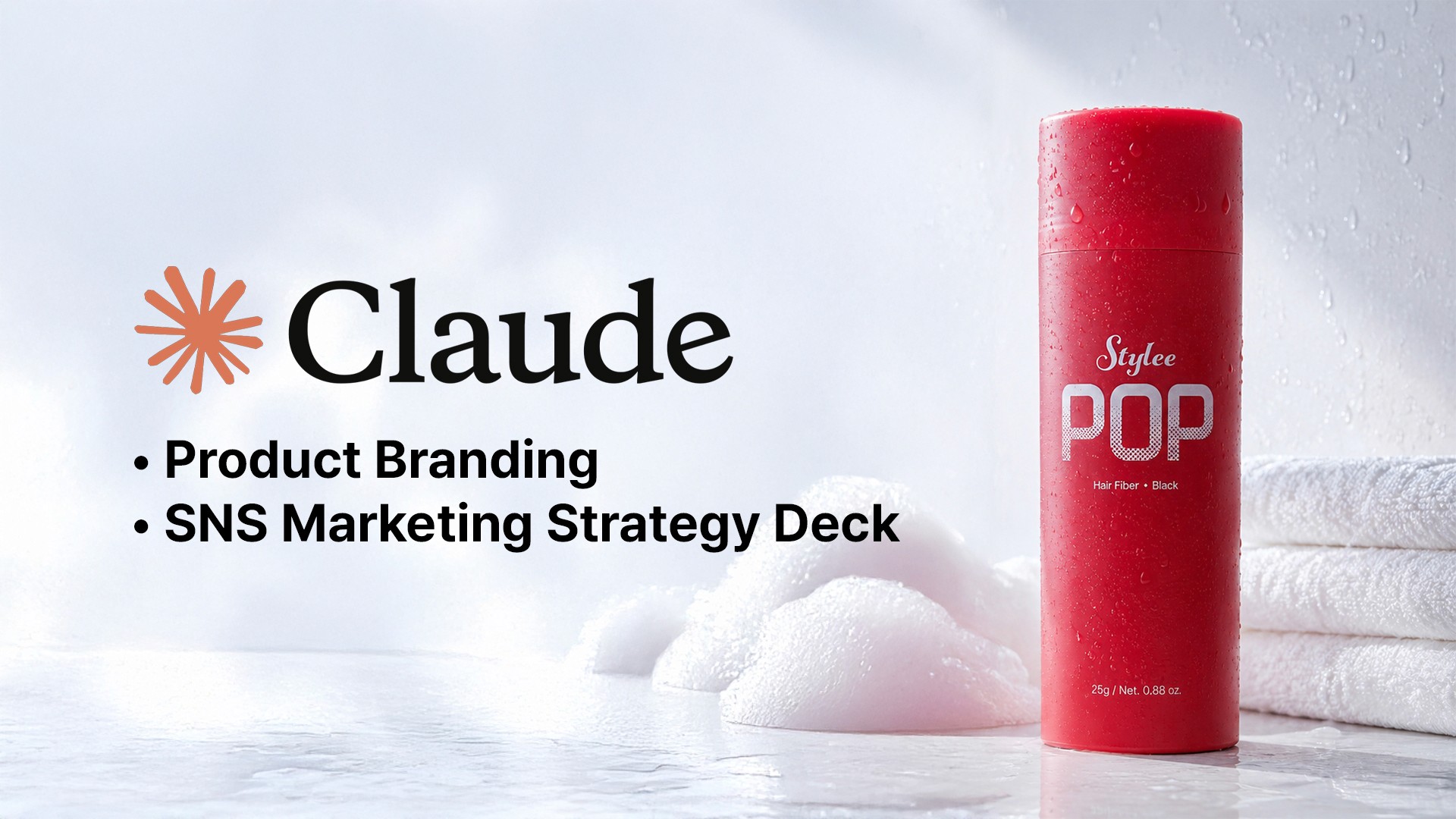
Image caption: Claude can turn one prepared product image into a complete branding and SNS marketing strategy deck.
Step 1: Understand Claude Plans and What You Can Do
Before starting, it helps to understand the Claude plan options.
Claude can be used for free, so you can start this workflow without paying.
The Free plan is useful for light brainstorming, short drafts, product analysis, and simple brand strategy ideas.
However, if you want to create a long strategy deck, revise it several times, upload files, and generate a PowerPoint file, you may reach limits faster.
Claude Pro is more practical for regular work.
It is useful if you often create marketing strategy documents, branding decks, blog drafts, campaign plans, or long-form content.
Claude Max is designed for users who need much higher usage than Pro.
Team and Enterprise plans are better for teams that need collaboration, administration, workspace control, and stronger organization-level features.
This tutorial can be started on Claude Free.
But if you want to create a complete deck with repeated revisions and file generation, Pro or above may be more comfortable.
Step 2: Prepare One Real Product Image
For this tutorial, we will start with one real product image.
This image should already be prepared before opening Claude.
A good product image should clearly show the product.
The package shape should be visible.
The label or front design should be readable if possible.
The color and material should not be heavily distorted.
The background should not be too messy.
A front-facing or 45-degree product photo usually works best.
This image will become the main reference for the entire strategy deck.
Claude will use it to understand the product’s first impression, packaging mood, possible target audience, brand personality, SNS visual potential, and overall marketing direction.
If the product image is too dark, blurry, or visually confusing, prepare a cleaner product image first.
Step 3: Upload the Product Image and Ask Claude to Analyze It
Now upload the product image to Claude.
Do not ask for a full PPT immediately.
First, ask Claude to analyze what is visible in the image.
Prompt to use:
The most important part of this prompt is the instruction not to invent facts.
Claude may be able to infer many things from an image, but product facts such as ingredients, certifications, price, functions, and claims should not be invented.
Ask Claude to separate what is visible from what is assumed.
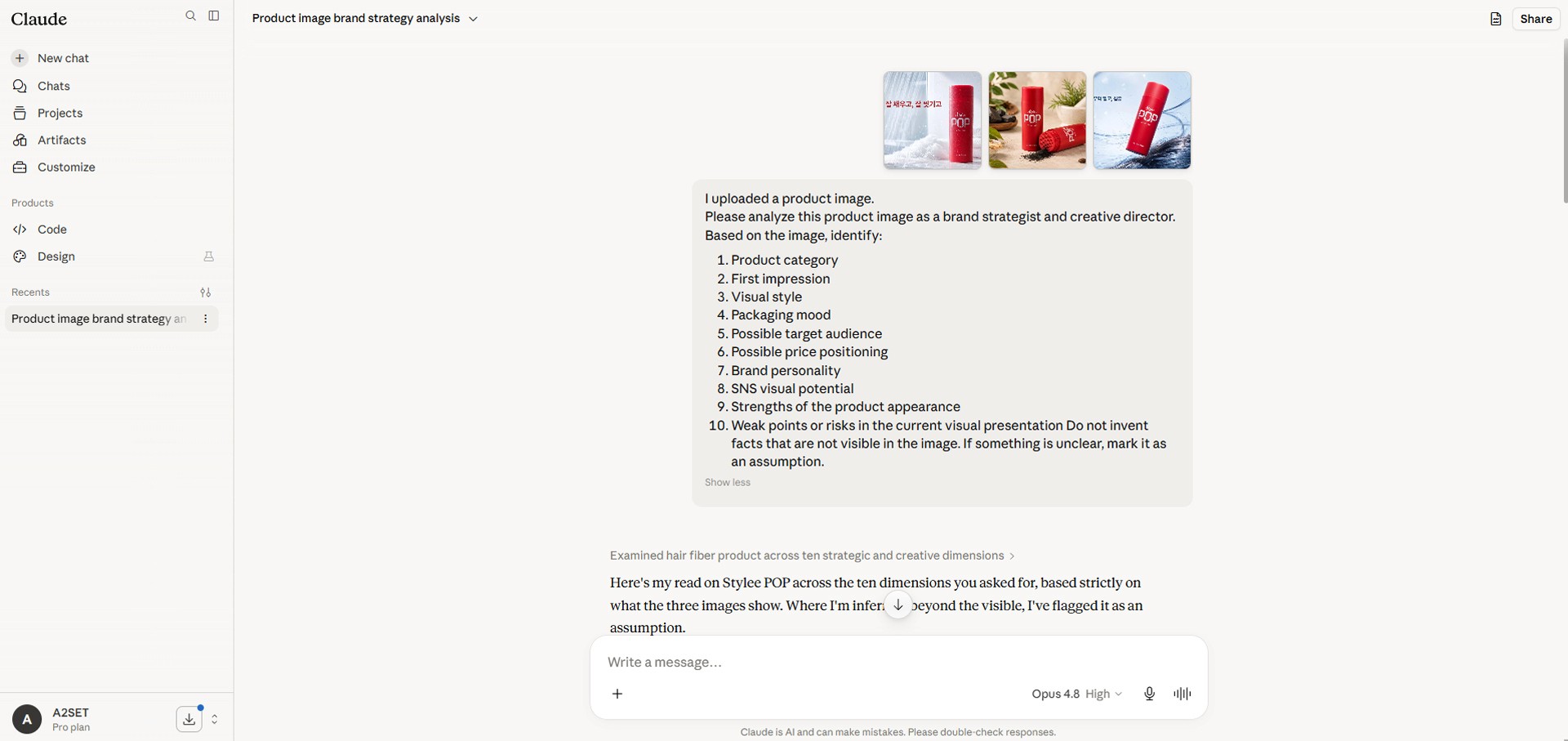
Image caption: Ask Claude to analyze the uploaded product image before creating the branding strategy.
Step 4: Add Product Information and Brand Goals
Image analysis alone is not enough.
A product image can show packaging mood and visual style, but it may not reveal the product’s actual benefits, price, sales channel, or launch goal.
Now provide additional product information.
Prompt to use:
Replace the bracketed parts with your actual product information.
This step combines what Claude can see from the product image with what you know about the product.
That combination creates a much more accurate branding direction.
Step 5: Build the Full PPT Structure
Once the product analysis and branding direction are ready, create the deck structure.
This deck is not just a product introduction.
It is a complete product branding and marketing package proposal.
Prompt to use:
The product image analysis slide is important.
It shows that this deck is not a generic strategy template.
It is based on the actual uploaded product image.
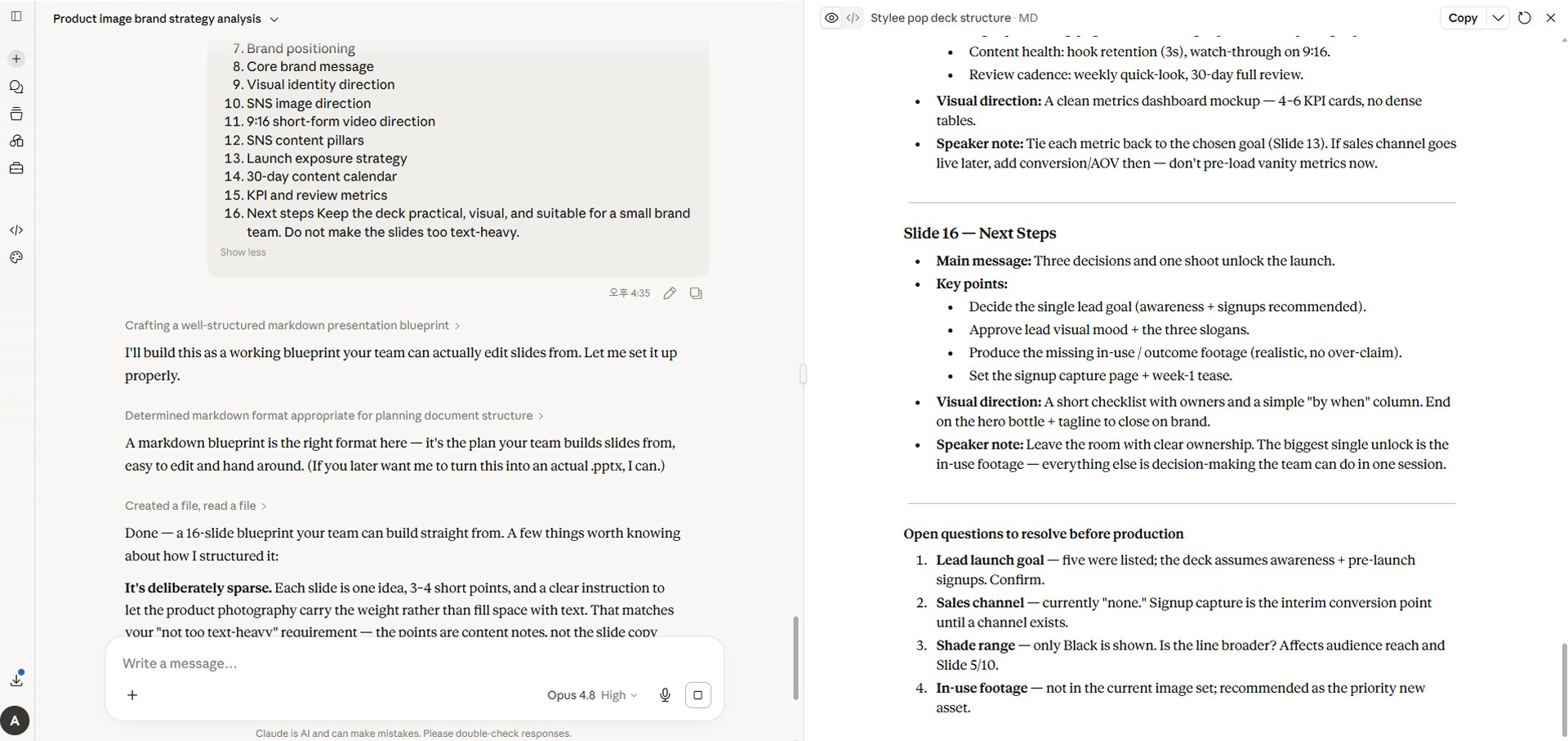
Image caption: Build the full deck structure around the uploaded product image, not around a generic product example.
Step 6: Create Branding Concept Directions
Now ask Claude to create several possible branding concepts.
Do not settle on the first idea immediately.
Compare a few possible directions and choose the strongest one.
Prompt to use:
This step helps you compare different possibilities.
For example, one concept may feel premium, another may feel practical and daily-use focused, and another may feel more viral and social-first.
Choose the direction that fits the product, audience, and launch goal best.
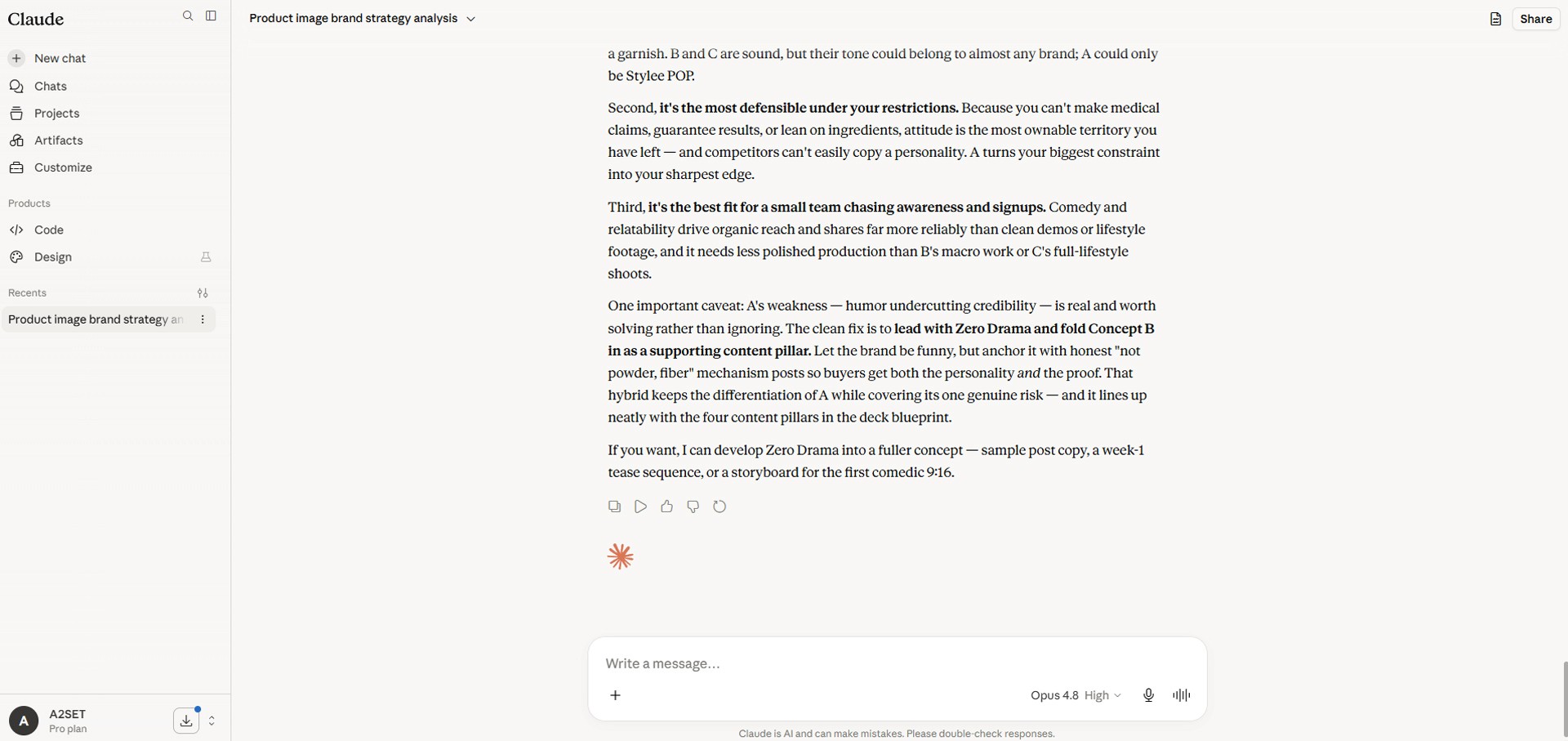
Image caption: Compare several branding concepts before choosing the strongest direction for the product.
Step 7: Create the SNS Image Direction
Now create the SNS image direction.
SNS visuals are not just pretty images.
They should become a repeatable visual system for the brand.
Prompt to use:
This step gives you practical visual directions for SNS.
It can include product-only images, lifestyle images, detail close-ups, usage scenes, thumbnails, and website banner ideas.
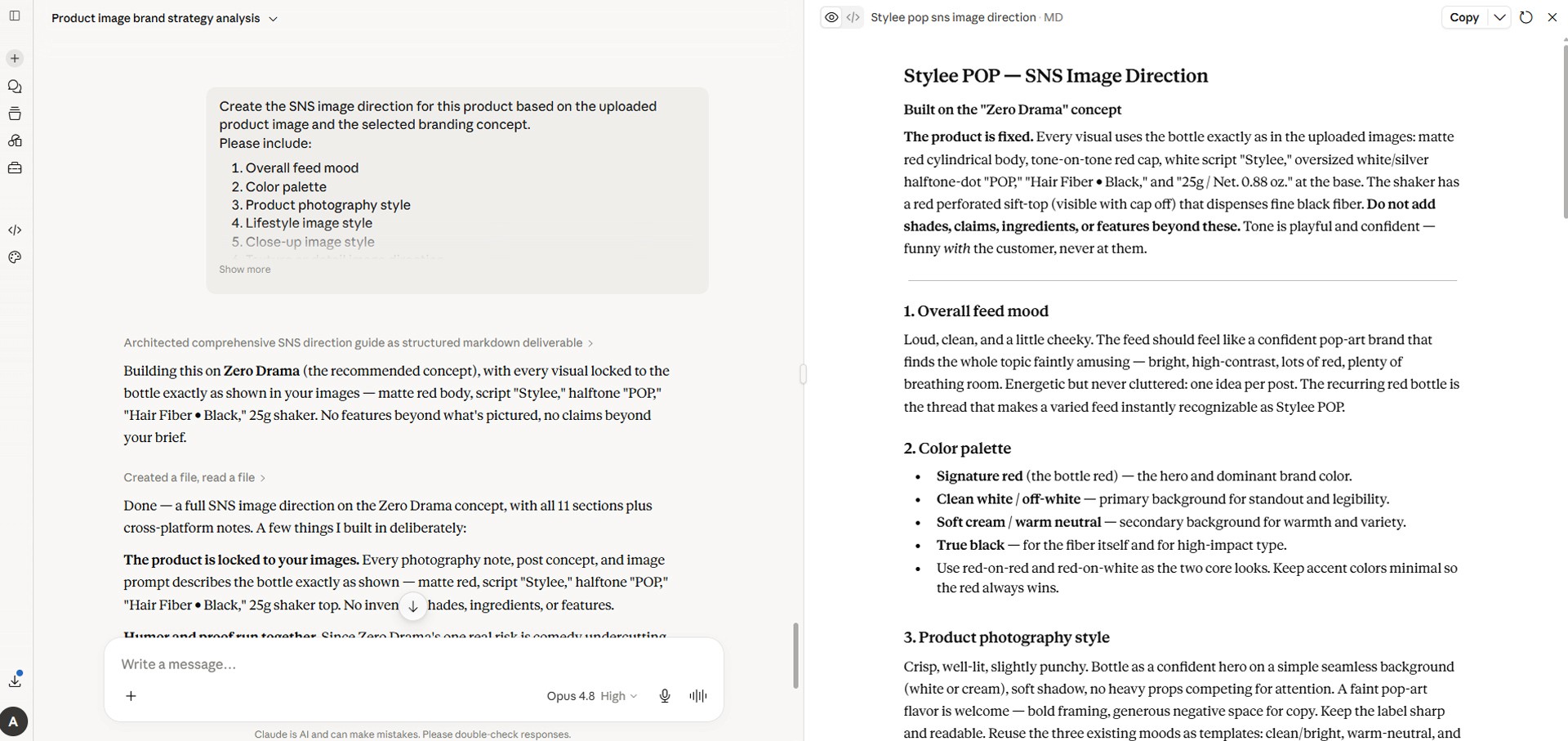
Image caption: SNS image direction turns the product branding strategy into repeatable visual content ideas.
Step 8: Plan 9:16 Short-Form Videos
The package plan should also include 9:16 video content.
Reels, TikTok, and YouTube Shorts are important exposure channels for product marketing.
Ask Claude to create short-form video concepts based on the uploaded product image.
Prompt to use:
9:16 video planning is different from horizontal advertising.
A strong vertical video usually needs a fast hook, a clear product moment, simple scenes, and a short CTA.
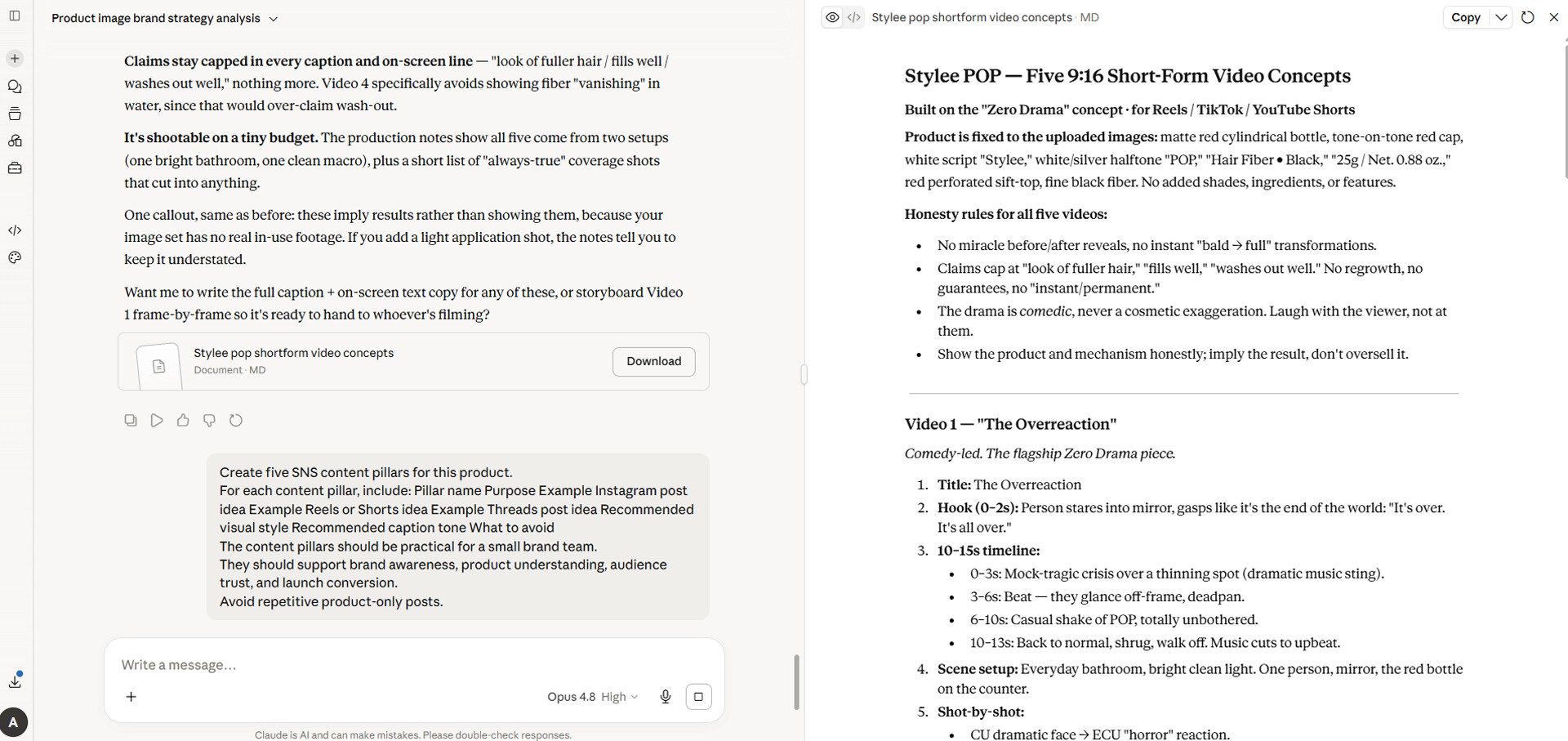
Image caption: 9:16 video planning helps turn the product into short-form content for Reels, TikTok, and YouTube Shorts.
Step 9: Create SNS Content Pillars
Now build the content pillars.
Content pillars are the repeatable themes that guide the brand’s SNS operation.
Prompt to use:
This helps the brand avoid posting the same product image every day.
The content can include customer problems, usage moments, product details, brand story, UGC-style content, and educational posts.
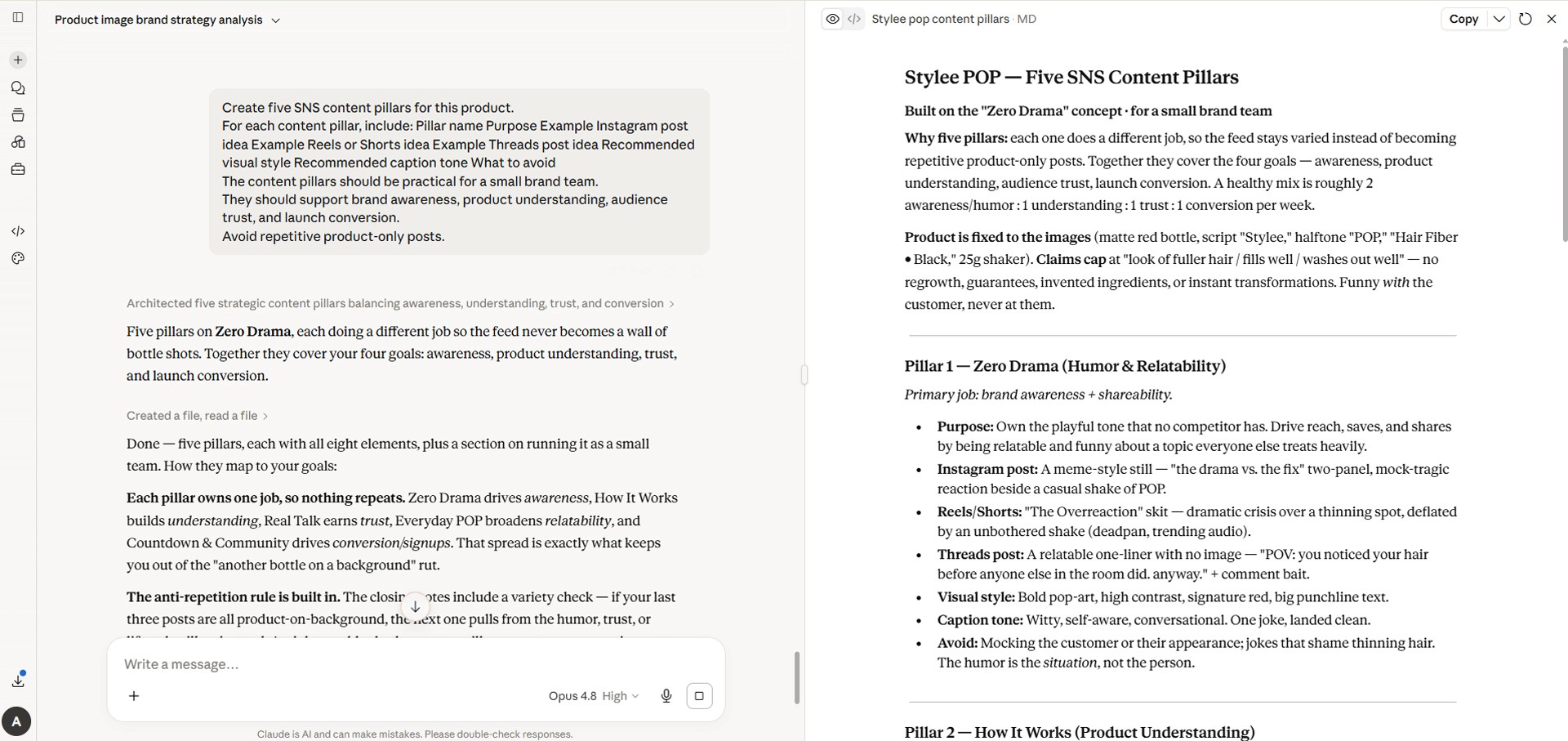
Image caption: Content pillars help the brand post consistently without repeating the same product message every day.
Step 10: Create the Launch Exposure Strategy
Branding and content ideas are useful, but the product still needs exposure.
Exposure strategy is not simply “post on SNS.”
You need to define what each channel does and how the launch content should flow.
Prompt to use:
This step connects content ideas with actual distribution.
For example, Instagram can build visual trust, Threads can share founder notes or product stories, TikTok and Shorts can drive discovery, and the brand website can explain the product in more detail.
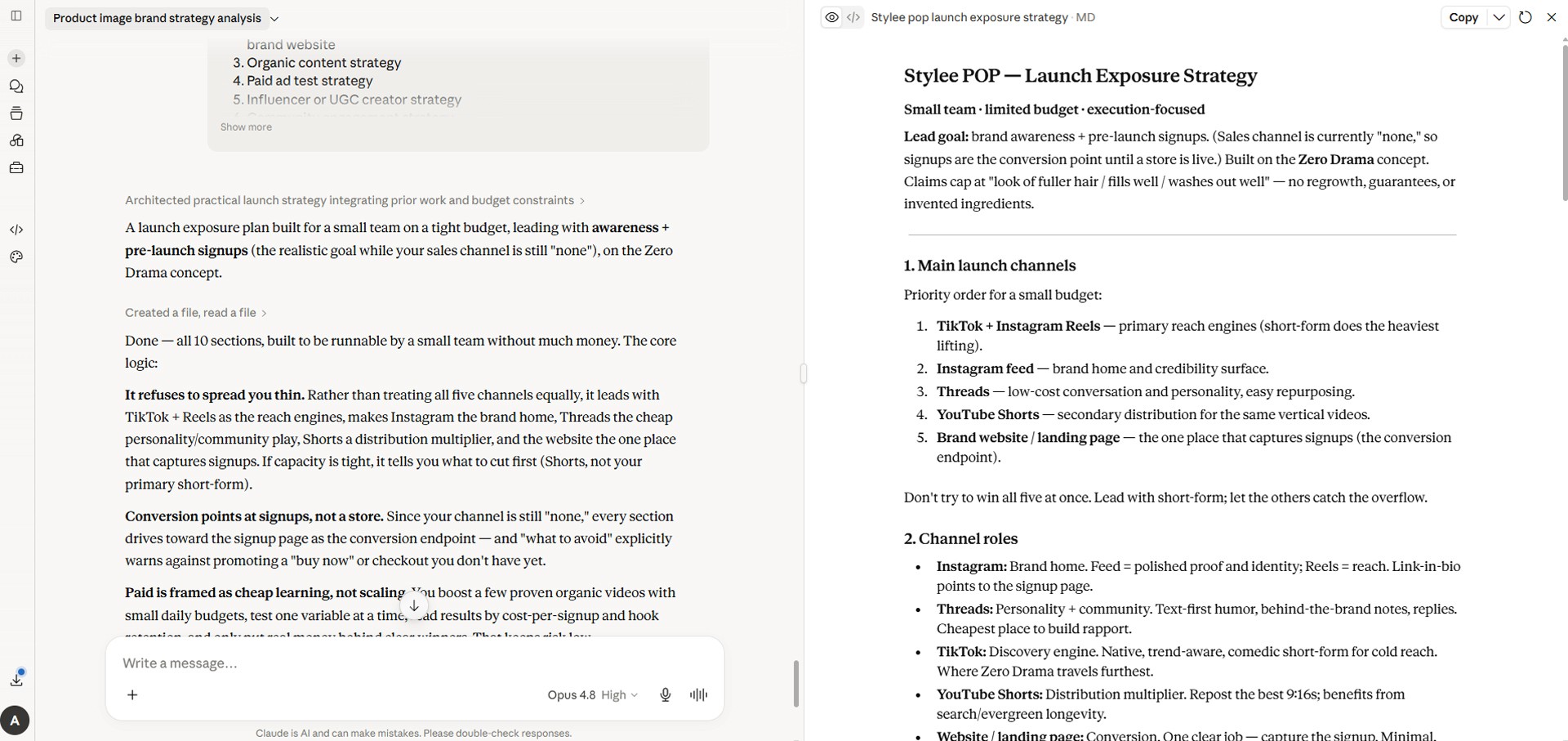
Image caption: Exposure strategy connects content ideas with launch timing, channel roles, and realistic growth goals.
Step 11: Build the 30-Day Content Calendar
Now turn the strategy into an action plan.
A strategy is hard to execute without a calendar.
Prompt to use:
This calendar becomes one of the most useful slides in the deck.
It turns the branding plan into something the team can actually follow.
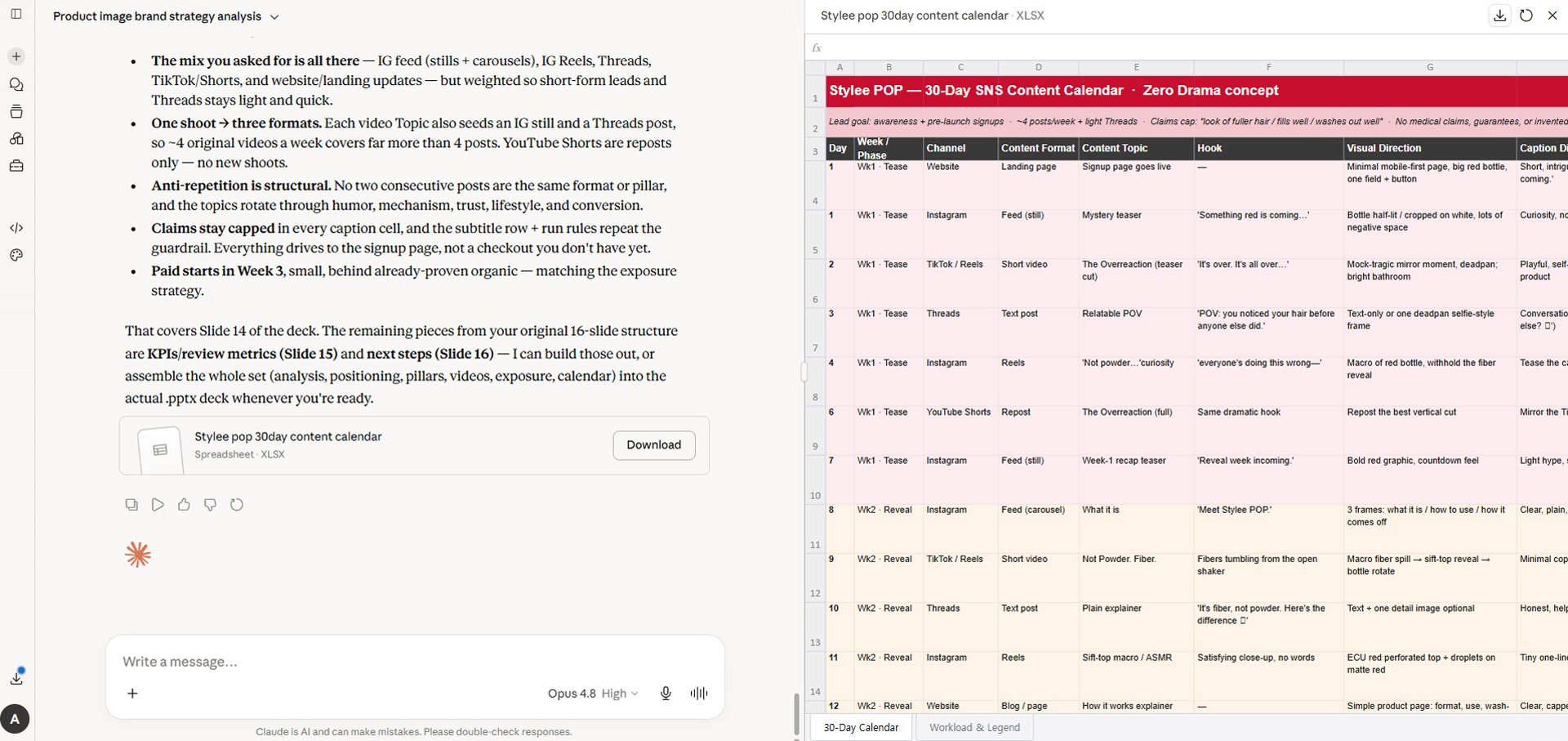
Image caption: A 30-day content calendar turns the branding strategy into a practical publishing plan.
Step 12: Create KPI and Review Metrics
SNS marketing needs measurement.
Do not only track views.
Different posts have different goals, so the metrics should be divided by purpose.
Prompt to use:
In the early launch stage, sales are not the only metric.
It is also important to learn which message, visual style, content format, and channel work best.
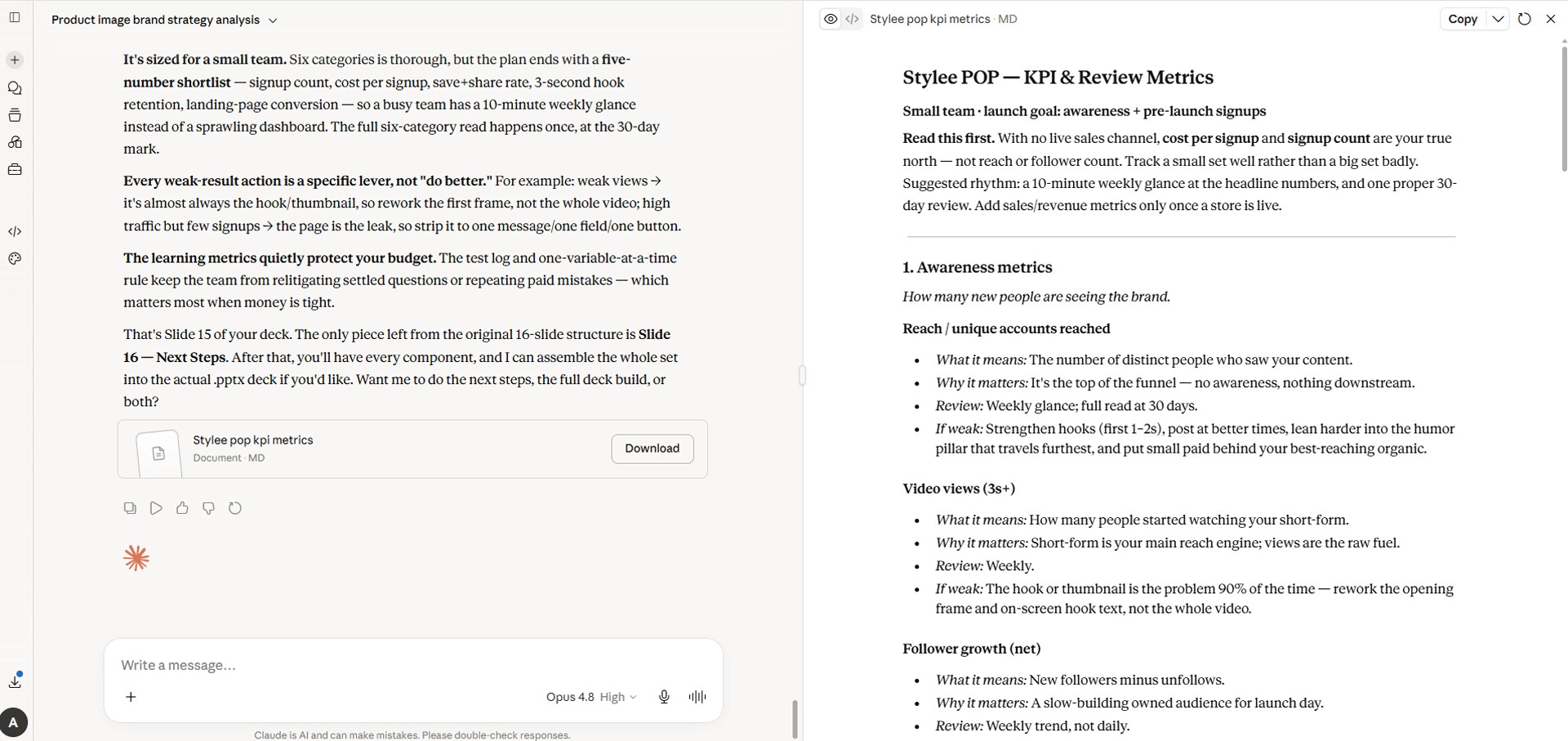
Image caption: KPI slides help the team understand what to measure after launching the SNS campaign.
Step 13: Ask Claude to Create the PPTX File
Now the strategy and slide structure are ready.
Ask Claude to create the actual PowerPoint file.
Prompt to use:
If file creation is available in your Claude environment, Claude may generate a downloadable PPTX file.
If the feature is unavailable or you hit usage limits, ask Claude to provide the slide-by-slide content first.
Then you can move the content into Canva, Google Slides, or PowerPoint manually.
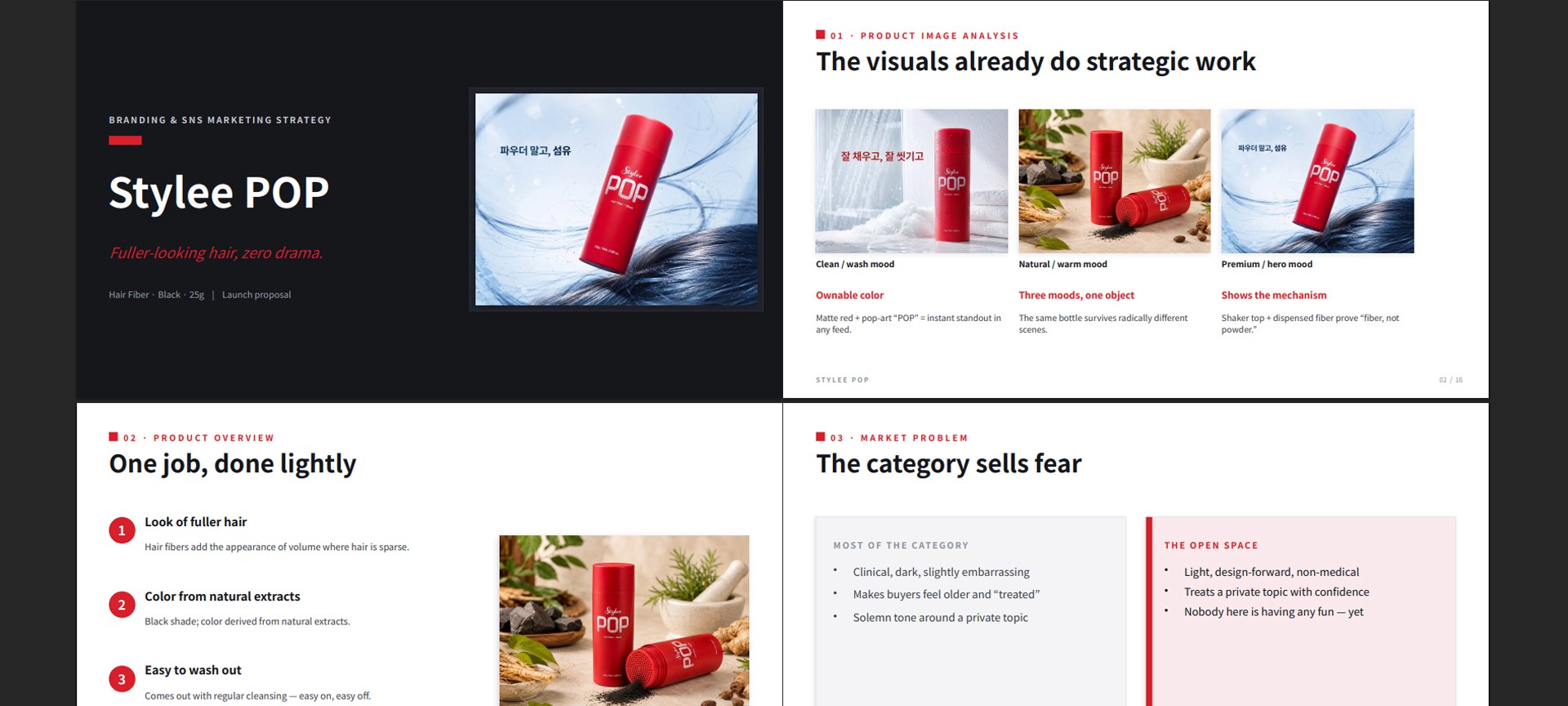
Image caption: Ask Claude to create the PPT only after the product analysis, strategy, SNS direction, and video concepts are approved.
Step 14: Review the Final PPT
Do not use the deck immediately after it is created.
Ask Claude to review it first.
Prompt to use:
This final review is important.
If Claude invented product benefits, features, ingredients, certifications, or unrealistic claims, you should remove them before using the deck.
A2SET Test Notes
The most important point in this workflow is to start with product image analysis.
If you ask Claude to “make a PPT” immediately, it may create a polished-looking slide draft, but the strategy can become too generic.
A better workflow is to upload the product image first and ask Claude to separate what is visible from what is assumed.
Then add the product name, target customer, sales channel, brand tone, launch goal, and restricted claims.
After that, create the branding concept, SNS image direction, 9:16 video ideas, exposure strategy, content calendar, and KPI plan.
The phrase “Do not invent facts” is especially important.
AI can easily create ingredients, certifications, prices, or features that were never provided.
For real business use, the final deck should always be reviewed by the product owner or marketing team.
Common Issues and Simple Fixes
If Claude analyzes the product image too generally, ask it to “focus only on what is visible in the image.”
If Claude invents product features, add “do not invent product features, certifications, ingredients, or claims.”
If the deck becomes too long, ask Claude to “reduce this to 12 to 16 slides.”
If the slides become too text-heavy, ask Claude to “make each slide more visual and less text-heavy.”
If the SNS strategy feels too abstract, ask Claude to “make the plan more execution-focused for a small team.”
If the 9:16 video ideas are too complex, ask Claude to “make each video simple enough to produce with one product image and basic lifestyle footage.”
If the calendar feels too demanding, ask Claude to “reduce the workload to a realistic posting schedule.”
If PPTX file generation is unavailable, ask for slide-by-slide content and move it into Canva, Google Slides, or PowerPoint manually.
Responsible Use Notes
Claude is useful for building product-image-based branding strategy and presentation structure.
But Claude does not verify your real product information for you.
Ingredients, functions, certifications, pricing, sales conditions, and usage instructions must be checked against real product documents.
Beauty, hair, wellness, and health-related products should avoid medical claims, guaranteed results, or exaggerated transformations.
Use the AI-generated deck as a strategy draft.
Before using it as a business proposal, advertising document, investor material, or official sales deck, a human should review and edit it carefully.
Also check the licenses of any product photos, logos, fonts, stock images, music, or video sources used in the final SNS images or 9:16 videos.
Claude Plan Pricing
The main Claude plans are currently as follows.
Free is $0.
It is suitable for light drafts, simple product analysis, and basic idea generation.
Pro is $17/month when billed annually, with $200 billed upfront.
Monthly billing is $20/month.
Pro is better for users who regularly create long documents, marketing strategy decks, brand plans, and blog drafts.
Max 5x is $100/month.
It is designed for individual users who need more usage than Pro.
Max 20x is $200/month.
It is suitable for users who use Claude heavily every day or work with long documents and repeated revisions.
Team Standard is $20/seat/month when billed annually.
Monthly billing is $25/seat/month.
Team Premium is $100/seat/month when billed annually.
Monthly billing is $125/seat/month.
Enterprise is designed for larger organizations that need advanced security, administration, compliance, and organization-level features.
Pricing can change depending on taxes, region, promotions, and Anthropic policy, so check the official Claude Pricing page before upgrading.
Conclusion
In this tutorial, we used Claude to create a complete branding and SNS marketing strategy deck based on one prepared product image.
The workflow is simple.
Prepare one real product image.
Upload the product image to Claude.
Ask Claude to analyze the image first.
Add product information and brand goals.
Create the full deck structure.
Compare branding concepts.
Create the SNS image direction.
Plan 9:16 short-form videos.
Create SNS content pillars.
Build the launch exposure strategy.
Create a 30-day content calendar.
Define KPI and review metrics.
Ask Claude to create the PPTX file.
Review and revise the final deck.
The key is not to start with a pretty PPT.
Start with the product image.
Then build the strategy.
Then turn the strategy into a deck.
Claude can be a powerful tool for brand operators, marketers, solo founders, and creators who need to quickly organize a product branding and marketing package.
But AI-generated strategy should always be reviewed against real product information and business goals.
We will return in the next A2SET tutorial with more practical AI workflows for creators, brand builders, marketers, and small teams.
Quick FAQ
Can I start with only one product image?
Yes. One product image is enough to start. However, the result will be more accurate if you also provide the product name, target customer, sales channel, brand tone, key benefits, and restricted claims.
Can I follow this tutorial without Claude Design?
Yes. This tutorial uses regular Claude, not Claude Design.
Can I do this with Claude Free?
You can start with the Free plan for a simple draft. For a longer strategy deck, repeated revisions, and file generation, Pro or above may be more practical.
Can Claude create a real PPTX file?
Claude can create PowerPoint files, but availability and limits may depend on your account, plan, and current feature access.
Can Claude create SNS images directly?
Claude is useful for SNS image direction, image prompts, layouts, copy, and content planning. Actual image generation may depend on the Claude features available to your account or other image generation tools.
Can Claude create 9:16 videos?
Claude is useful for planning 9:16 video concepts, shot lists, copy, scenes, and prompts. Actual video generation usually requires a separate AI video tool or editing tool.
Can I use the deck for a real business?
Yes, as a draft. Before using it as a business proposal, advertising material, investor deck, or official marketing plan, review product facts, pricing, ingredients, certifications, legal wording, and advertising claims carefully.