The Ultimate Higgsfield AI Tutorial
Hello creators, welcome back to A2SET’s AI Tutorial.
AI video creation is becoming more powerful every month, but the workflow can still feel scattered.
You may create an image in one tool, animate it in another tool, use a different platform for camera movement, and then move somewhere else again for editing or social media formats.
For creators and marketers, this can slow down the entire production process.
Higgsfield AI is designed to make this workflow more centralized.
Instead of working with only one image or video model, Higgsfield brings multiple AI creation tools into one platform. This makes it useful for creators who want to test cinematic videos, AI influencers, social ads, motion presets, and campaign-style content without constantly switching between many different services.
This tutorial will walk through what Higgsfield AI is, what its main features are, and how creators can use it in a practical workflow.
The goal is not to say that one platform will solve every production problem. AI video still requires direction, testing, editing, and review. However, Higgsfield can be a useful creative workspace when you want to generate and refine visual content more efficiently.
Image caption: Higgsfield AI brings multiple AI image, video, motion, and creative tools into one workspace for creators and marketers.
What Is Higgsfield AI?
Higgsfield AI is an AI creative platform for generating and editing images, videos, ads, cinematic scenes, and AI influencer-style content.
Instead of focusing on just one generation model, Higgsfield works more like a creative workspace where users can access different tools and workflows depending on the project.
For example, you may use one workflow for cinematic video, another for AI influencer content, another for advertising templates, and another for camera movement or visual effects.
This makes Higgsfield useful for creators who want to experiment with different AI video styles without rebuilding the workflow from zero each time.
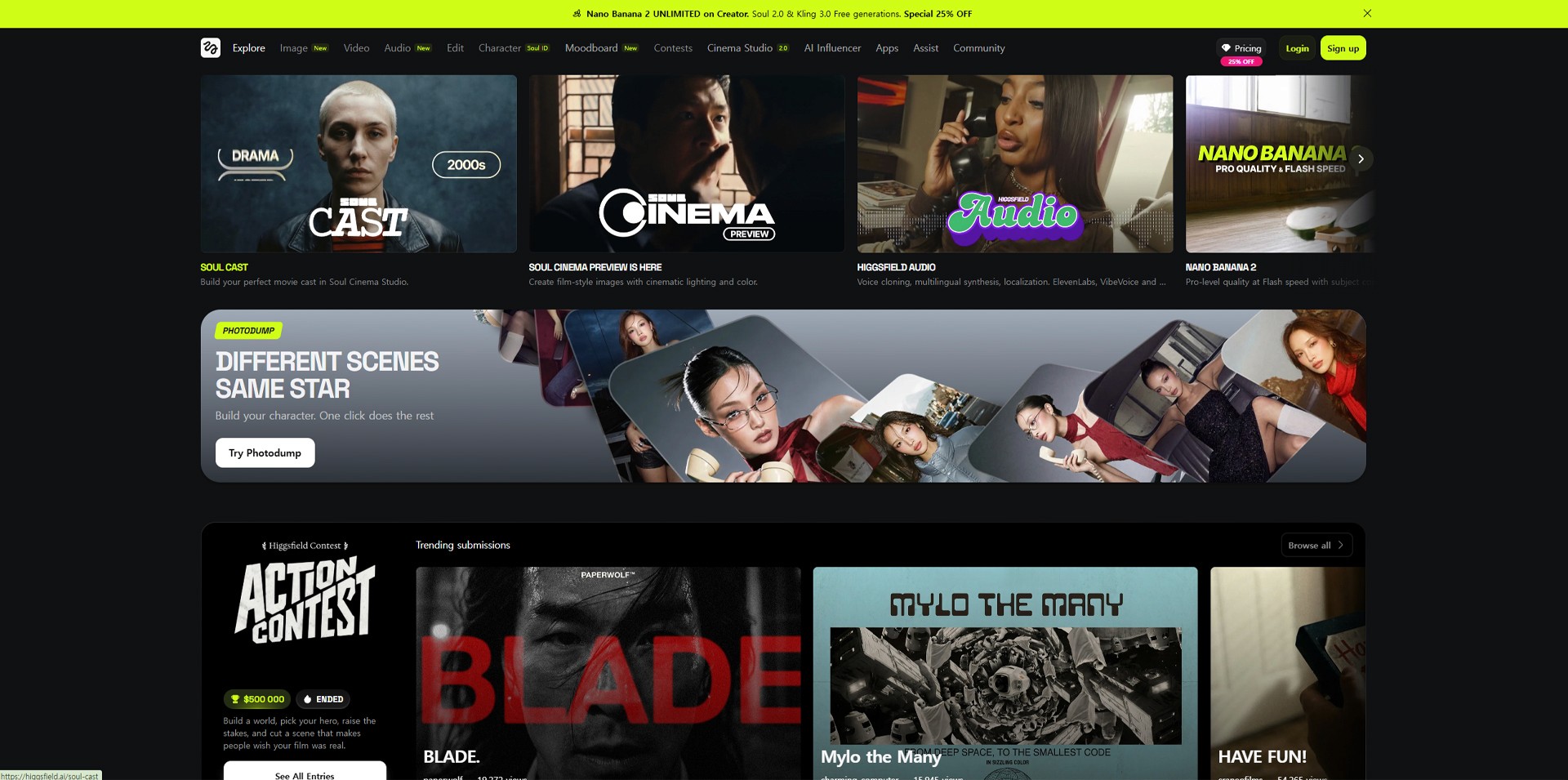
Image caption: Higgsfield can be used as a central workspace for testing AI video models, creative apps, cinematic tools, and influencer-style content.
Standout Feature 1: Building Consistent AI Influencers
One of the most useful parts of Higgsfield is its AI influencer workflow.
For social media content, consistency matters.
If an AI character looks different in every image or video, it becomes difficult to use that character as a recognizable brand asset.
With AI influencer-style workflows, creators can create or upload a character reference and use that identity across different scenes, outfits, and content formats.
This can be useful for virtual influencer planning, creator-style product videos, social media campaigns, short-form ads, and brand character development.
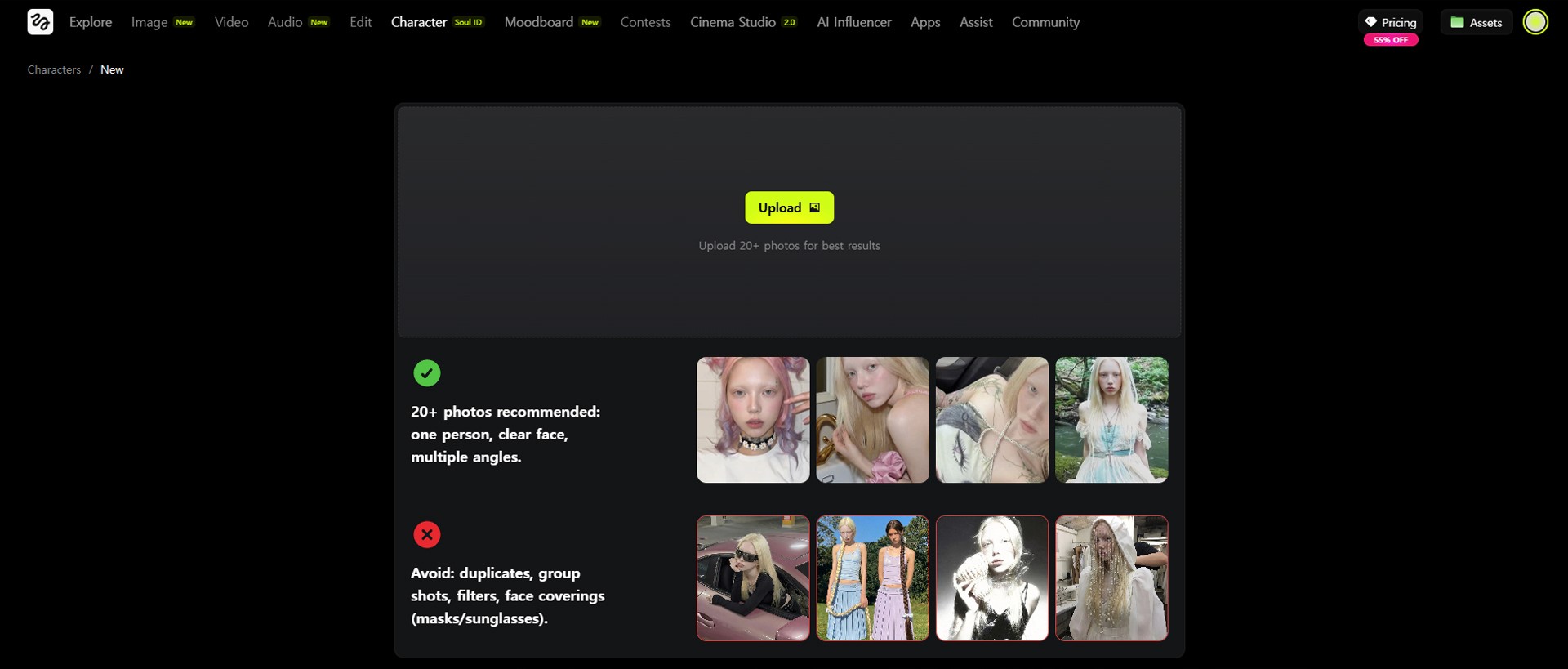
Image caption: AI influencer workflows can help creators build a more consistent digital character identity across different content formats.
When using this type of feature, the most important thing is to start with a clear character direction.
A good character reference should have a visible face, clear hairstyle, readable outfit, and simple lighting.
If the first reference is too unclear, the later results may also become unstable.
Also remember that identity consistency in AI generation is not always perfect. You should review the final output carefully, especially before using it for brand or client work.
Standout Feature 2: Motion Control for More Directed Movement
AI video can look impressive, but movement is often difficult to control.
A character may move in a way that looks random, too stiff, or unrelated to the original idea.
This is where motion control workflows can be useful.
In Higgsfield, motion control-style tools can help creators guide movement more intentionally by using action references, motion presets, or camera-based direction depending on the selected workflow.
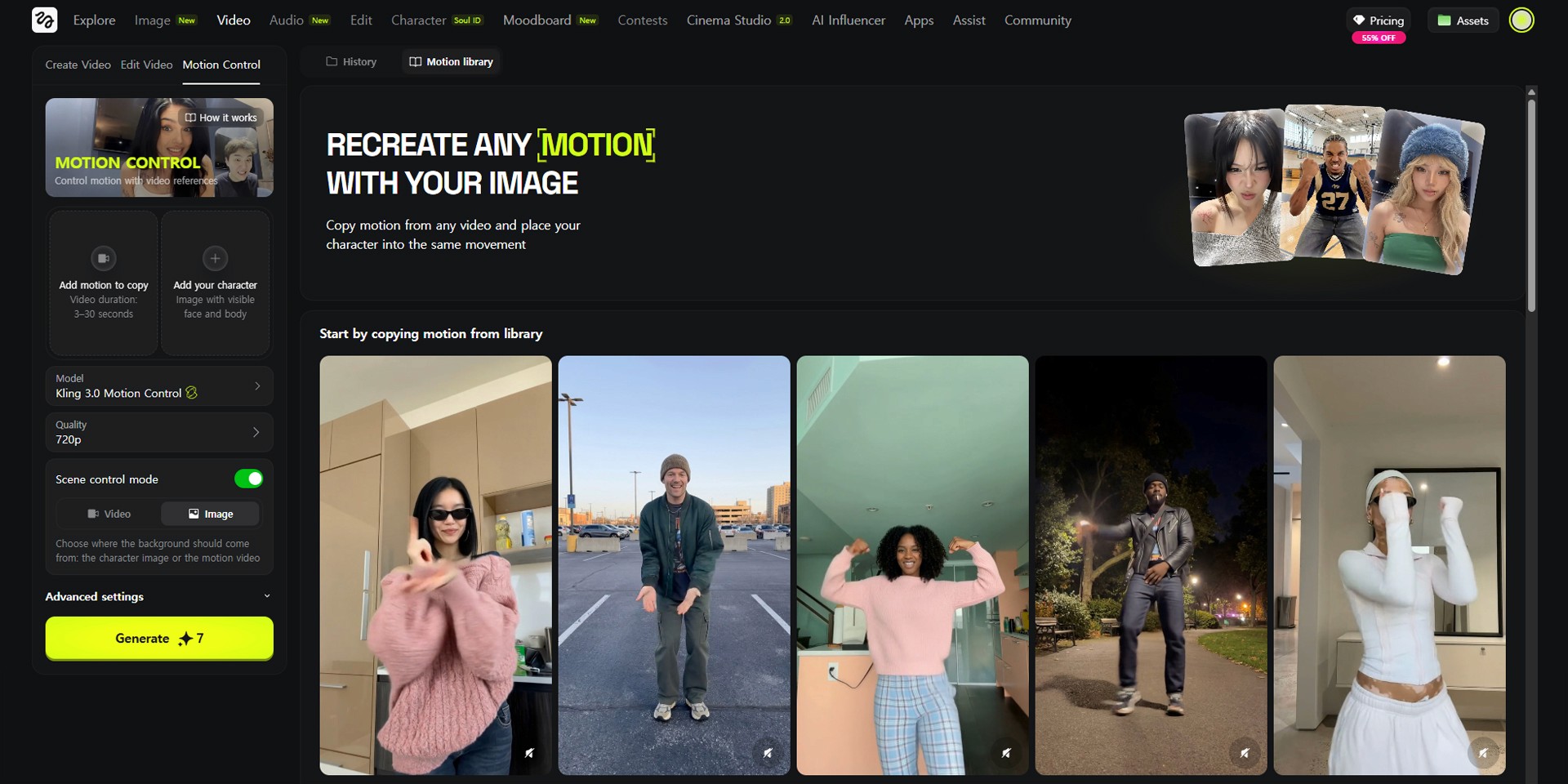
Image caption: Motion control workflows can help guide character action, camera movement, and pacing more clearly than a simple text prompt.
For example, if you want a character to dance, point, walk, react, or perform a specific movement, using a motion reference can sometimes produce a more controlled result than describing the action only with text.
This does not mean motion transfer will always be perfect.
The result can depend on the quality of the reference, the complexity of the movement, the model used, and the character design. But for short-form content, ads, and concept tests, motion control can make the video generation process feel more directed.
Standout Feature 3: Cinema Studio and Creative Apps
Higgsfield also provides workflows for cinematic video generation and creative app-style templates.
Cinema Studio is designed for users who want more control over the look and feel of cinematic shots. Depending on the current interface and available tools, users may work with camera direction, lens-like settings, shot styles, characters, locations, and motion ideas.
This can be useful for film-style concept shots, pitch visuals, cinematic social content, music video concepts, and brand storytelling.
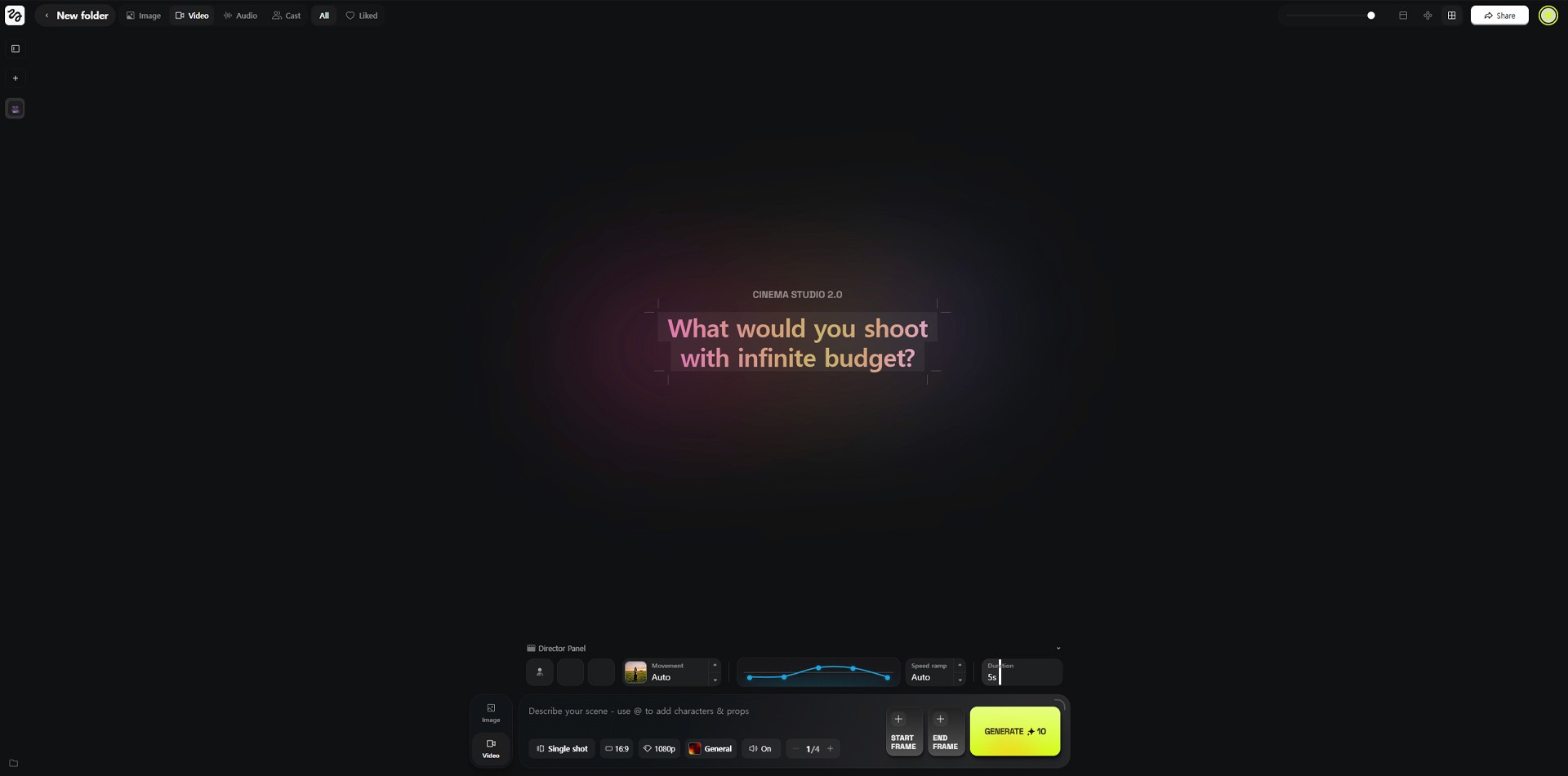
Image caption: Cinema Studio-style workflows help creators think more like directors by planning camera, mood, motion, and visual style.
Higgsfield Apps are more template-driven.
These can be useful when you want to create specific content formats more quickly, such as trend-style videos, ad concepts, transitions, product visuals, visual effects, or social media experiments.
The benefit of these apps is speed.
Instead of writing a complex prompt from the beginning, you can start from a prepared format and customize the idea for your own content.
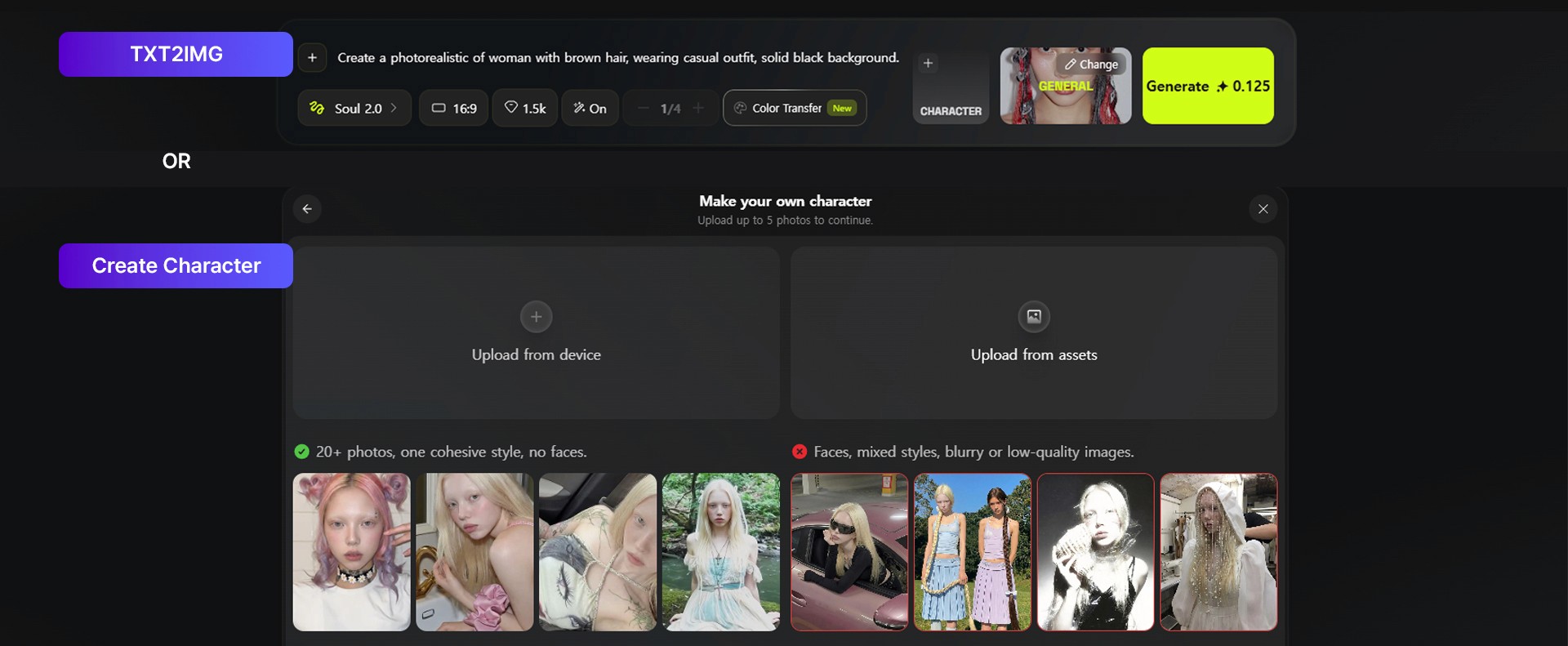
Image caption: Higgsfield Apps can help creators test social media formats, ad concepts, transitions, and visual effects faster.
Step 1: Prepare Your Assets
Before generating a video, prepare your base materials.
This can include a character image, product image, reference video, brand visual, style reference, or a simple text idea.
If you are making an AI influencer video, prepare a clear character reference.
If you are making a product ad, prepare a clean product image.
If you are testing a motion control workflow, prepare a reference video that clearly shows the movement you want.
The cleaner your input is, the easier it is for the AI to understand your direction.
Try to avoid blurry images, messy backgrounds, hidden faces, covered products, or unclear movement references.
Step 2: Choose the Right Workflow
After preparing your assets, choose the workflow that fits your goal.
If you want to animate a still image, start with an image-to-video workflow.
If you want to create a character-based social video, use an AI influencer workflow.
If you want to test cinematic camera movement, explore Cinema Studio.
If you want to create a social trend or ad format quickly, check the Apps section.
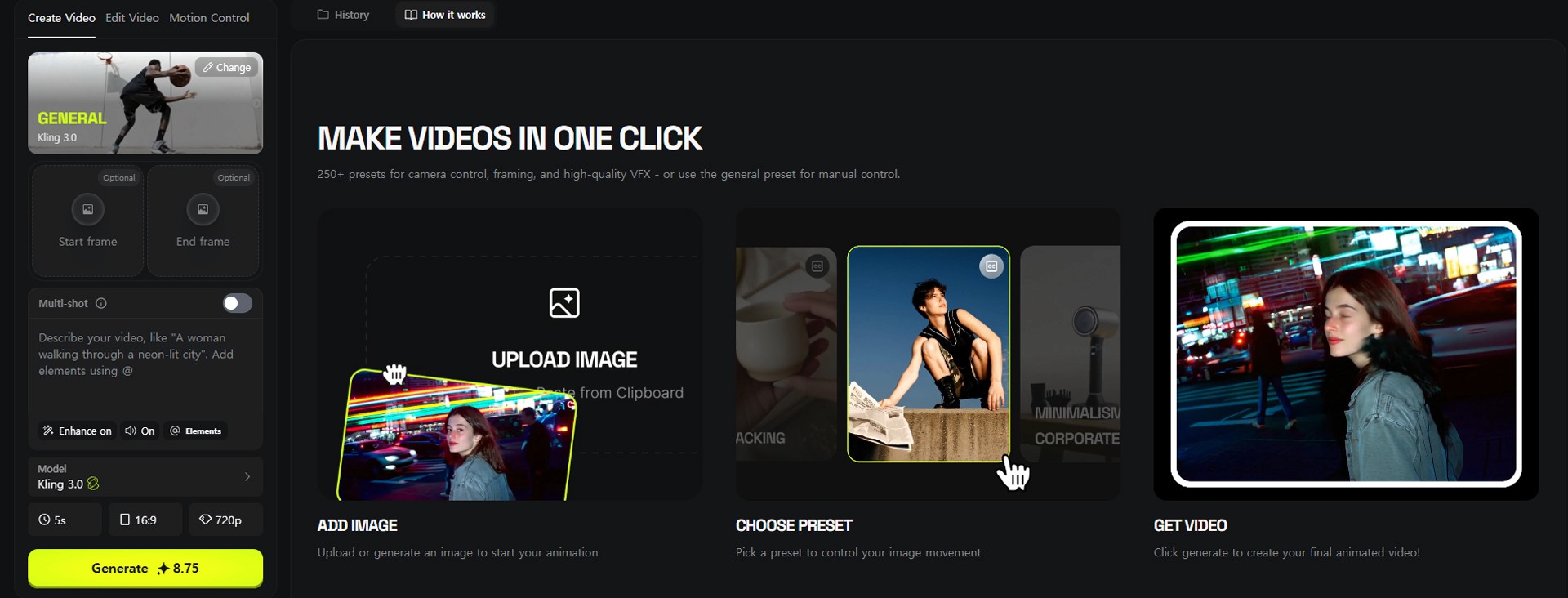
Image caption: Choose the workflow based on your goal, such as AI influencer content, cinematic video, image-to-video, or social ad creation.
Do not try to use every feature at once.
Start with one clear goal.
For example:
Create a 5-second product hero shot.
Generate an AI influencer talking video.
Test a camera movement.
Create a social media ad variation.
Try a short cinematic scene.
A focused goal usually creates a better result than a broad prompt with too many ideas.
Step 3: Select a Model, Preset, or App
Higgsfield gives access to different models and creative tools depending on your account, plan, and current platform availability.
For video generation, you may see different model options such as Kling, Veo, Sora, Seedance, Wan, or other supported tools depending on the current platform lineup.
The best model depends on your goal.
Some models may be better for realistic motion.
Some may be better for cinematic visuals.
Some may be better for stylized or social media content.
Some may be faster for quick experiments.
Image caption: Higgsfield lets creators choose from different models, presets, or app-style workflows depending on the project goal.
If you are new, start with a preset or template first.
Once you understand the result, try more advanced controls.
This helps you avoid wasting credits on overly complex tests before you understand the workflow.
Step 4: Generate, Review, and Refine
After selecting the workflow and writing your prompt, generate the first result.
Do not expect the first version to be final.
AI video generation often needs iteration.
After the result is ready, review it carefully.
Check whether the character remains consistent.
Check whether the camera movement matches the idea.
Check whether the product stays recognizable.
Check whether the scene feels connected.
Check whether the motion looks natural.
Check whether there are visual glitches or unwanted changes.
Image caption: Review the generated result carefully before downloading or using it in a public project.
If the result is close but not perfect, refine the prompt or try a different workflow.
For example, if the character changes too much, strengthen the identity instruction.
If the camera moves too randomly, simplify the camera direction.
If the product changes shape, add a clear product consistency instruction.
If the result feels too generic, add more specific mood, setting, or composition details.
Pricing and Plan Notes
Higgsfield works with a credit and plan-based structure, and the exact pricing, credits, model access, and feature limits can change over time.
The original article mentions plan tiers such as Basic, Pro, Ultimate, and Creator. However, for a public tutorial, it is safer to treat pricing as something users should verify directly from the current Higgsfield pricing page.
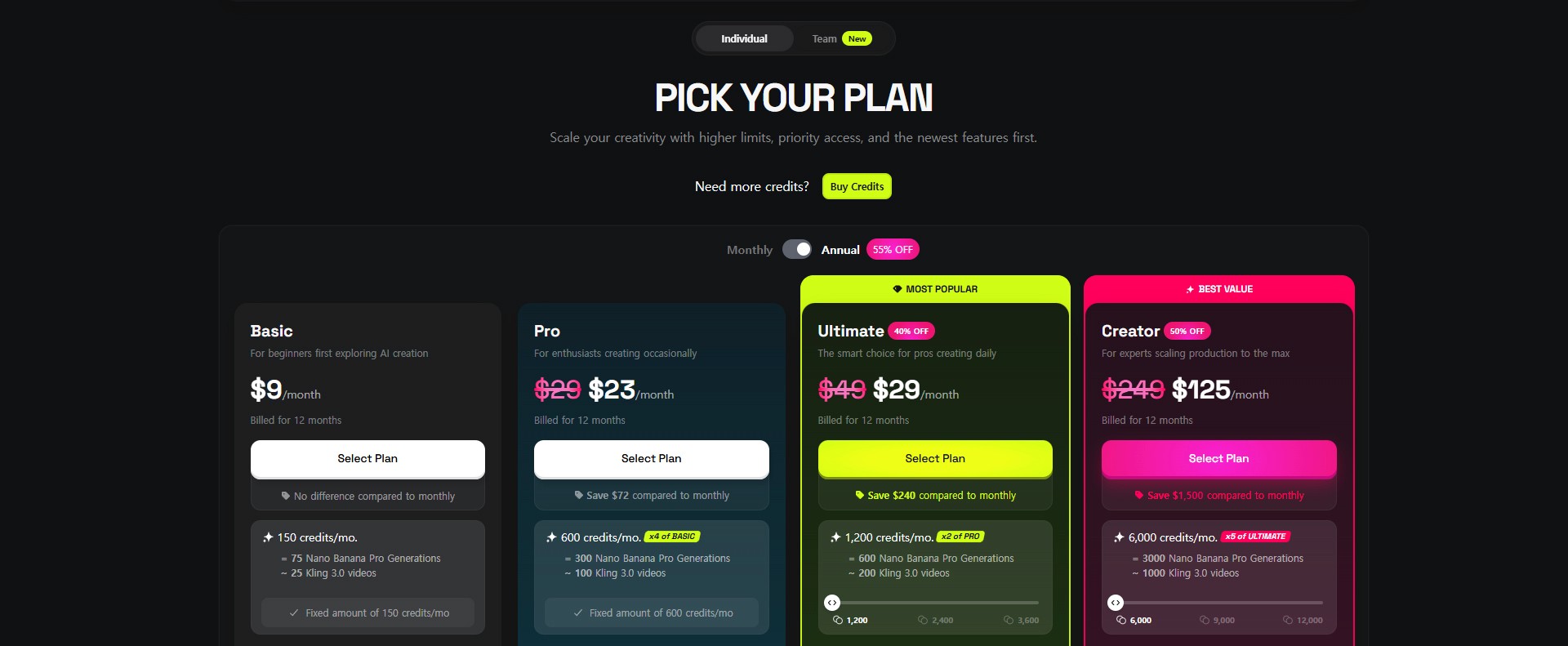
Image caption: Higgsfield Plans.
Before using Higgsfield for client work or commercial projects, check:
available models,
credit cost per generation,
export quality,
watermark policy,
commercial usage terms,
team or collaboration features,
and monthly plan limits.
Image caption: Before using Higgsfield for serious production, check the current plan, credit, model access, and commercial usage conditions.
This is especially important because AI platforms update quickly.
A feature or credit cost shown in an older screenshot may not match the current version.
Common Issues and Simple Fixes
If the generated character changes too much, use a clearer character reference and add identity consistency instructions.
If the movement feels random, simplify the action and use motion control or a clearer reference if available.
If the video looks too generic, describe the lighting, camera angle, environment, and mood more clearly.
If the product changes shape, use a clean product image and tell the model to preserve the product shape, color, and label area.
If the result costs too many credits, start with shorter tests, lower settings, or template-based workflows before generating longer versions.
If you are unsure which model to use, create small test generations with the same prompt and compare the results.
Why This Workflow Is Useful
Higgsfield is useful because it gives creators one place to test multiple types of AI visual content.
Instead of jumping between separate tools for every step, you can explore image generation, video generation, cinematic scenes, apps, influencer content, and motion workflows from one platform.
This can be especially helpful for:
AI influencer content,
product ads,
social media videos,
cinematic concept shots,
campaign previews,
motion control tests,
and creator portfolio experiments.
The platform is not a replacement for creative direction.
You still need to decide the concept, write clear prompts, review the output, edit the best result, and check usage rights.
But for fast visual testing, it can be a very useful part of a modern AI creator workflow.
Responsible Use Notes
When creating AI influencer or character content, avoid using someone’s real face, celebrity likeness, private person, or existing creator identity without permission.
Do not create fake testimonials from AI-generated people if viewers may think they are real customers.
For product ads, do not make claims that you cannot support.
For client or commercial work, always check the platform’s usage terms, commercial rights, watermark rules, and model restrictions.
It is also helpful to keep a simple production record.
Save your prompts, reference images, model choices, generated versions, final selected output, and usage notes.
This makes the workflow easier to manage if you later use the content in a brand, campaign, or public project.
Conclusion
Higgsfield AI can be a useful creative platform for AI video, cinematic content, AI influencers, marketing visuals, and social media experiments.
In this tutorial, we looked at the main idea of the platform, including AI influencer workflows, motion control, Cinema Studio, creative apps, asset preparation, model selection, generation, refinement, and pricing checks.
The key lesson is simple.
Do not treat AI video as a one-click final production process.
Treat it as a creative workflow.
Prepare clear assets.
Choose the right workflow.
Start with a focused prompt.
Generate short tests.
Review the result carefully.
Then refine before publishing.
That is how Higgsfield can become more useful as part of a real creator workflow.
We will return in the next A2SET tutorial with more practical AI workflows for creators, marketers, designers, and small production teams.
Quick FAQ
What is Higgsfield AI?
Higgsfield AI is an AI creative platform for generating and editing images, videos, cinematic scenes, social media content, and AI influencer-style visuals.
Is Higgsfield only for AI video?
No. It includes different creative tools and workflows, including image generation, video generation, cinematic tools, apps, and influencer-style content workflows depending on current platform availability.
Can I create AI influencers with Higgsfield?
Yes, Higgsfield provides workflows that can help create and use consistent AI influencer-style characters. Results should still be reviewed carefully before public use.
Does motion control always work perfectly?
No. Motion results can vary depending on the reference, model, character design, and movement complexity.
Should I check the pricing before using it?
Yes. Pricing, credits, model access, and plan limits can change, so always check the current Higgsfield pricing page before serious or commercial use.
Can I use Higgsfield for commercial content?
Possibly, but you should check the current commercial usage terms, model restrictions, watermark policy, and rights guidance before using generated content in paid work.
What is the best way to start?
Start with one simple goal, such as generating a short product video, an AI influencer test, or a cinematic concept shot. Use short tests before spending credits on longer outputs.