The Ultimate Guide of ChatGPT Storyboards + Seedance 2.0
Title
Viral on X! The Ultimate Step-by-Step Guide to 'Animation' with ChatGPT Storyboards + Seedance 2.0
Introduction
Hello, creators! Welcome to a2set's AI Tutorial.
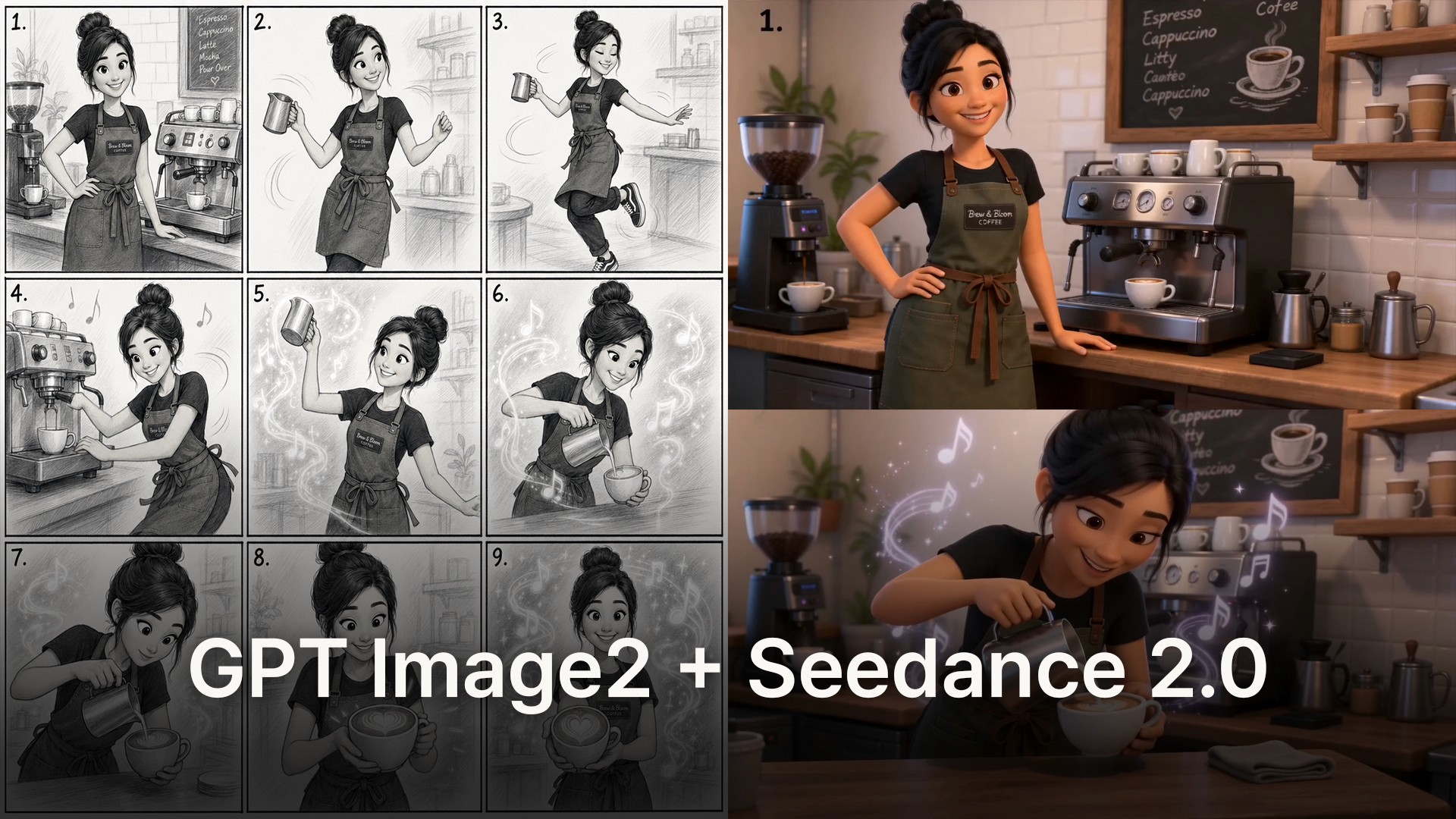
Have you seen the short video going viral on your X (formerly Twitter) timeline lately? It’s a high-quality 3D animation in a Pixar style where a barista character dances to the rhythm of the music while creating beautiful latte art.
Surprisingly, this video wasn’t made using complex 3D software. It was generated using just two images: a roughly drawn '2D black-and-white storyboard' and a 'character sheet'.
The core of this magical pipeline is the powerful combination of 'GPT Image 2 (DALL-E 3)', used to generate a consistent character storyboard in a single comic strip, and the robust Multi Reference technology of 'Seedance 2.0', the ultimate video generation model.
Today, we will completely dissect the workflow of Kōda (@aimikoda), the creator behind this viral video, and share the English prompt writing methods perfectly tailored for the Seedance 2.0 studio setup!
🛠️ Step 1: Generate a 'Consistent Character 9-Panel Storyboard' in One Image with ChatGPT
This is where many creators get confused. To make a video, you first need a 'storyboard' as the skeleton. But the character's face shouldn't change from panel to panel, right? The key is to instruct ChatGPT (or Midjourney) with a clear layout to extract everything into a single, perfect image. For the best results, all prompts must be entered in English.
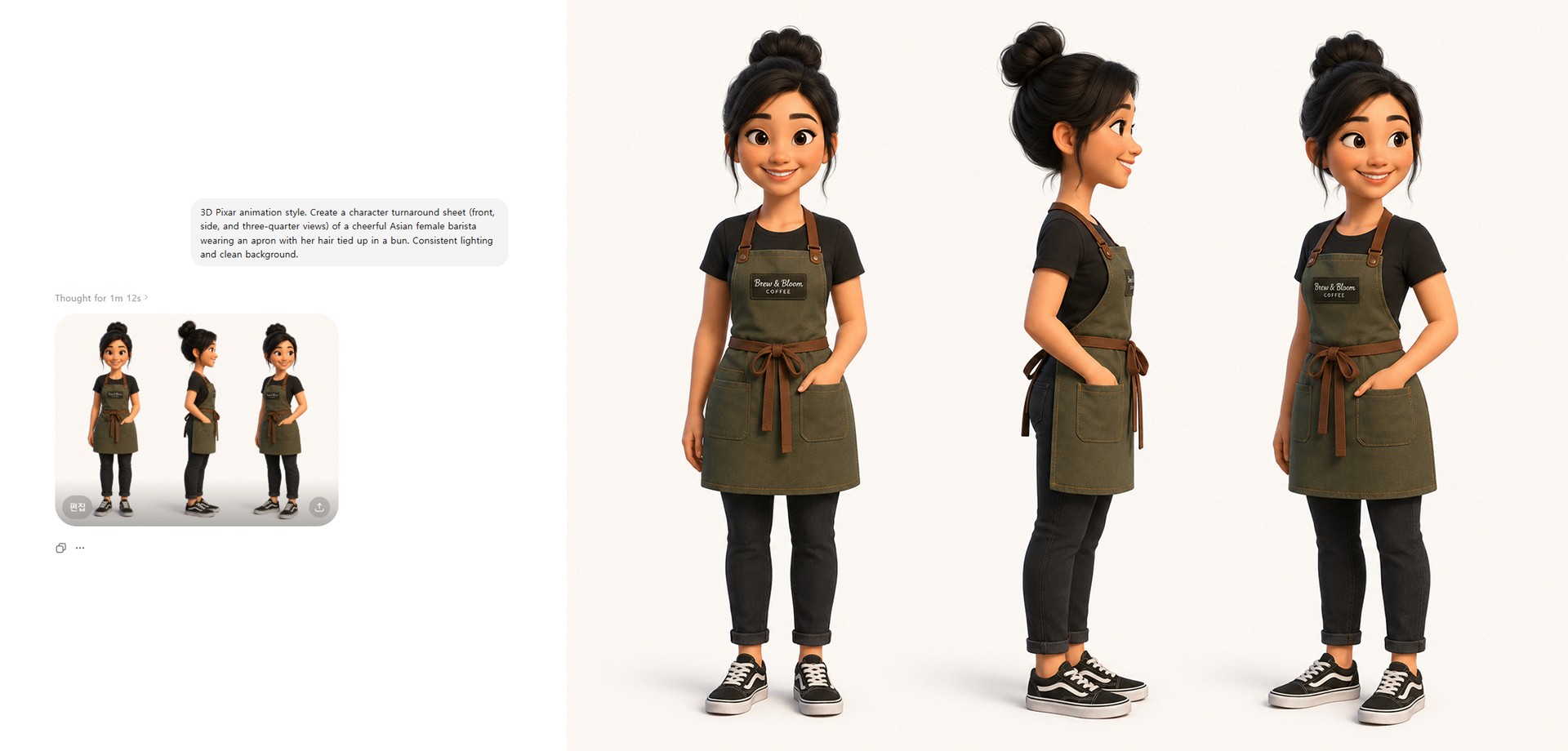
[Create a Character Sheet]
First, establish the main character's appearance. Log into ChatGPT and enter the prompt below to generate the original face.Prompt (Copy & Paste): >
"3D Pixar animation style. Create a character turnaround sheet (front, side, and three-quarter views) of a cheerful Asian female barista wearing an apron with her hair tied up in a bun. Consistent lighting and clean background."Download the image and save it as
character_sheet.png.
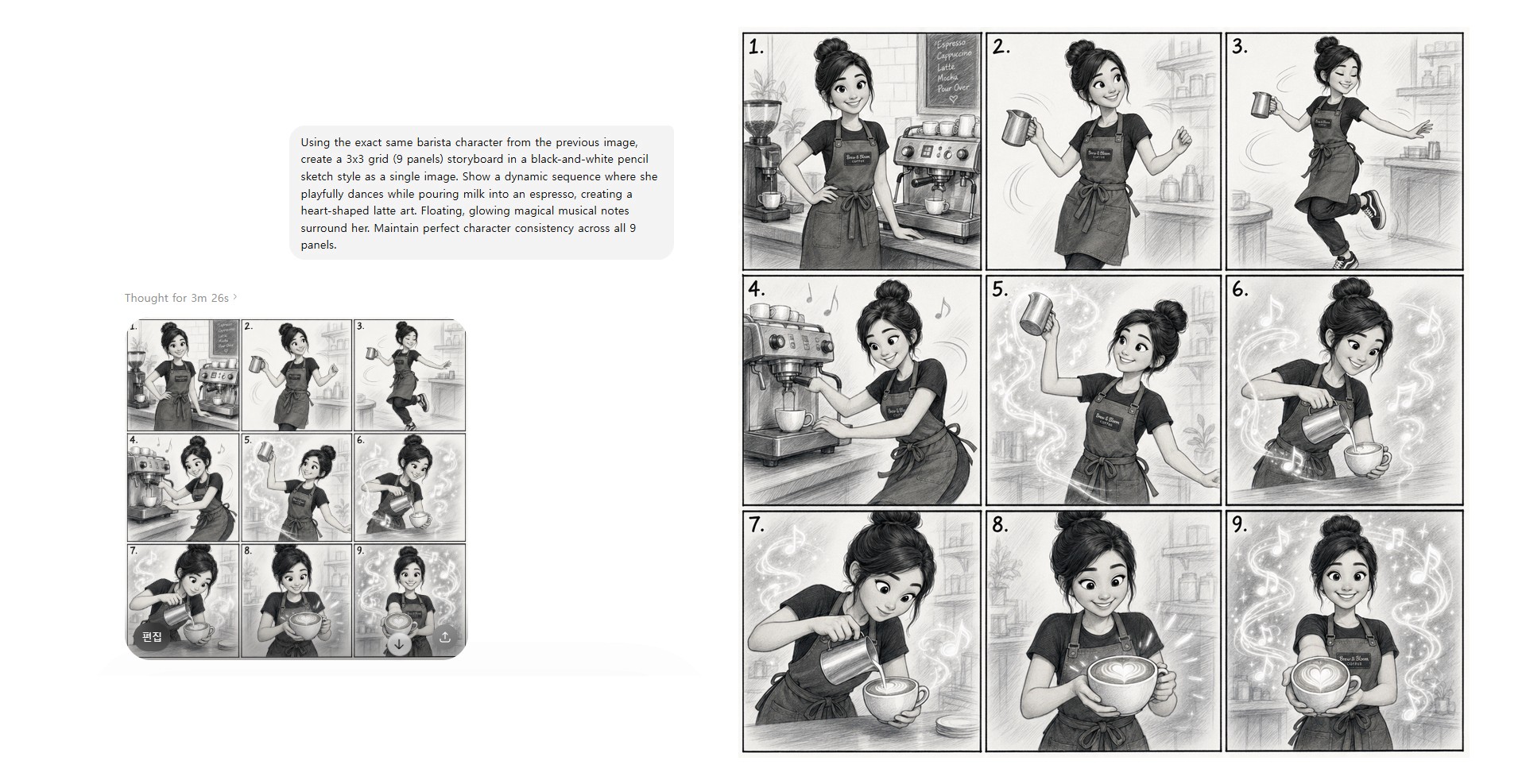
[Combine into a 9-Panel Storyboard]
Now, plan the sequence that will dictate the video's flow. Instruct the AI to draw a 3x3 grid black-and-white sketch while meticulously maintaining the characteristics of the character you just generated.
Prompt (Copy & Paste): >
"Using the exact same barista character from the previous image, create a 3x3 grid (9 panels) storyboard in a black-and-white pencil sketch style as a single image. Show a dynamic sequence where she playfully dances while pouring milk into an espresso, creating a heart-shaped latte art. Floating, glowing magical musical notes surround her. Maintain perfect character consistency across all 9 panels."Download the image and save it as
storyboard_9panels.png.
💻 Step 2: Studio Setup & Multi-Reference Upload
Once your materials are perfectly prepared, move to your video generator platform (e.g., Enhancor) to breathe life into the drawings. The process involves uploading your images to a single slot and configuring the settings intuitively.
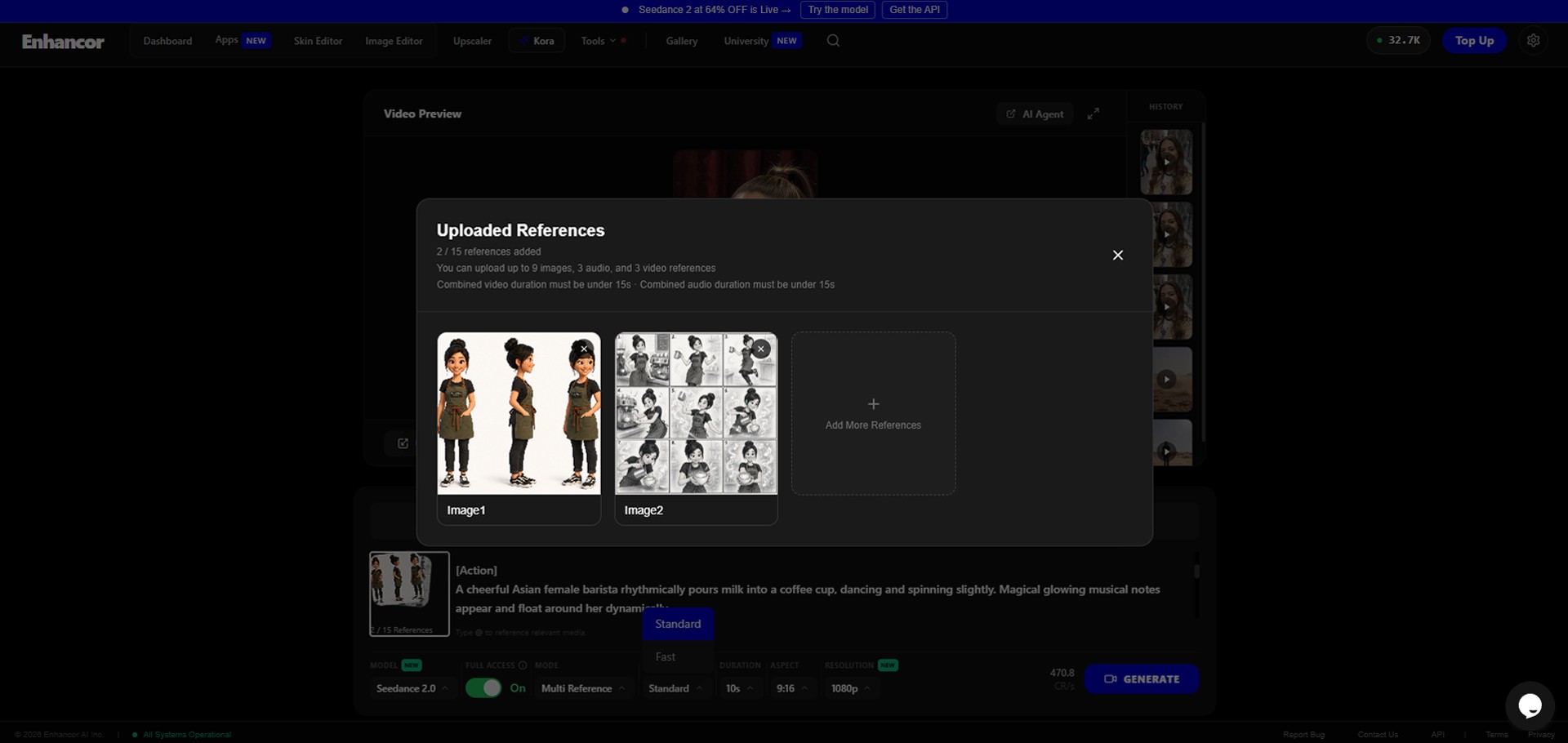
Open the [Image to Video] tab in the video generator menu.
Click the cloud-shaped [References] single upload slot located on the left side of the prompt window, and upload both the
character_sheet.pngandstoryboard_9panels.pngyou created in Step 1.🚨 [Core Technique] Bottom Panel Setup: For flawless results, configure the settings as follows:
MODEL: Select
Seedance 2.0, currently the most powerful video model.MODE: Must be set to
Multi Reference. (This mode must be active for the AI to combine and analyze multiple images simultaneously.)DURATION: Set generously to
15s(15 seconds) to capture all the dynamic movements across the 9 panels.ASPECT & RESOLUTION: Choose the
16:9ratio for Shorts/Reels formats and720pfor the highest visual quality.
🎵 Step 3: Official Master Prompt Utilizing @IMAGE Tags
The most powerful feature of this setup is that you can directly assign roles to the AI for each image using tags like @IMAGE1 and @IMAGE2 right within the prompt.
Audio Upload: Attach an upbeat jazz BGM or sound effect (about 10~15 seconds) to the audio slot to play in the background while the latte art is being made.
Prompt Writing: When you start typing in the prompt input box, a pop-up list of your uploaded images will appear. Assign the character image to
@IMAGE1and the storyboard image to@IMAGE2to give the AI crystal-clear roles.
[Seedance 2.0 Official Recommended Storyboard Prompt (For Copy & Paste)]
Once your prompt is ready, firmly click the blue [GENERATE] button!
🍿 Step 4: Check the Results! "The Magic of Overwhelming Time Reduction"
Hit play (▶️) on the fully rendered preview video.
The results will shock you. The AI reads the skeleton of the black-and-white sketch storyboard divided into 9 panels and transforms it into a single, continuous 3D space that flows seamlessly from a Mid-shot to a Close-up, exactly as instructed by the [Camera] prompt. The character dances to the upbeat rhythm of the uploaded audio while pouring the latte, flawlessly maintaining the face from the character sheet we pinned as @IMAGE1.
Of course, if you look closely, the AI might not have perfectly implemented 100% of every detail and movement from your storyboard without a single error. The directing might slightly deviate from your original intention, or the music beats might not align razor-sharp down to the exact frame.
However, the true value of this workflow lies in its 'overwhelming time reduction'. In the past, this would have been an arduous task requiring experts to spend days or even weeks—3D character modeling, rigging the bones, frame-by-frame animating, lighting setups, camera walking, and lengthy rendering times.
That massive amount of time has been compressed into just two images (a storyboard and a character sheet) and a 5-minute rendering wait. Even if it means compromising on some minor details, the fact that a solo creator can whip up a 'musical short-form' of this caliber sitting at a desk is an incredible blessing.
Conclusion
Until recently, AI video was nothing more than an 'uncontrollable random gacha' where character faces were crushed and compositions never went your way.
But with the advent of the [ChatGPT Consistent Storyboard + Seedance 2.0 Multi Reference (@IMAGE Tags) + Structured Official Prompt] pipeline, AI video generation is now strictly under the '100% control of the director (creator)'.
Open ChatGPT right now and pull out a rough storyboard using an English prompt. Then, breathe life and rhythm into it through Seedance 2.0. The 3D animation rendering that used to keep you up for nights will now be completed in just 5 minutes right on your desk today.
We'll be back in the next a2set tutorial with the trendiest and most disruptive AI workflows shaking up the global creator scene! Leave a comment if you have any questions.