A2SET AI Support Bot for WordPress
Product Type & Category
AI AGENT TOOLS
Artificial Intelligence (AI) Software
Tags
agent, chatbot, free, plugin, wordpress
Description
A free self hosted AI support bot plugin for WordPress, built for website owners who want to add a simple AI chat experience using their own OpenAI API key.
This plugin allows you to place an AI support bot on your WordPress site through a shortcode or an optional floating chat bubble. It is designed for lightweight customer support tasks such as answering common questions, explaining policy details, and guiding visitors with concise AI generated replies.
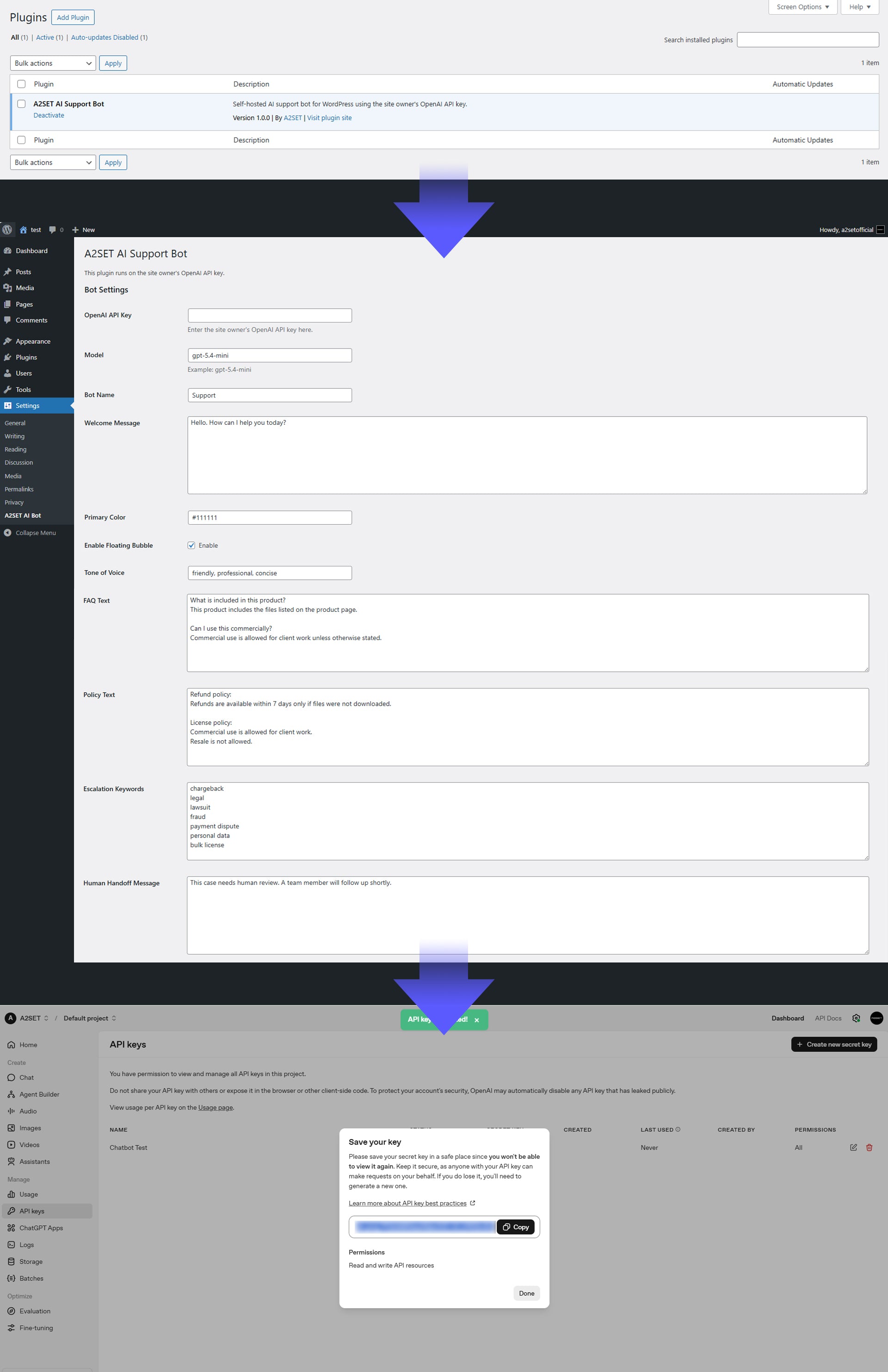
The bot can be customized directly from the WordPress admin panel. You can set the bot name, welcome message, primary color, tone of voice, FAQ text, policy text, escalation keywords, and human handoff message.
When a visitor sends a message, the plugin sends the request through your OpenAI API key and returns a response from the selected model. If the message contains predefined escalation keywords, the bot can skip normal AI handling and show a human review message instead.
This product is best suited for simple support workflows and FAQ based communication inside a WordPress website.
Kit Details
WordPress plugin zip file
Main plugin PHP file
Front end chat widget JavaScript
Front end chat widget CSS
Uninstall file for option cleanup
Admin settings page
Shortcode support
Optional floating chat bubble
OpenAI Responses API integration
Basic IP based rate limiting
Escalation keyword handling
Human handoff message support
Best For
WordPress websites
Digital product stores
Creator websites
Small business support pages
FAQ based customer support
Basic store policy guidance
First response customer communication
How to Use
Upload the plugin zip file to your WordPress site through the Plugins menu.
Activate the plugin in WordPress.
Go to Settings > A2SET AI Bot in the WordPress admin panel.
Enter your own OpenAI API key.
Set up your preferred options:
Model name
Bot name
Welcome message
Primary color
Tone of voice
FAQ text
Policy text
Escalation keywords
Human handoff message
Add the shortcode below to any page or post where you want the chatbot to appear:
[a2set_ai_bot]
If the floating bubble option is enabled in settings, the chat bubble will also appear on the front end without needing to place the shortcode everywhere.
Test the chatbot on your live site and adjust the FAQ text, policy text, and escalation keywords as needed.
License
Free download
Commercial use allowed unless otherwise stated
Resale, redistribution, or re upload of the original files is not allowed
Exclusive ownership is not transferred
Users are responsible for their own OpenAI API usage and related costs
Important Notes
Digital product only
No physical item will be shipped
WordPress is required
An OpenAI API key is required and is not included
OpenAI API usage fees are billed separately by your API provider
This plugin is designed for lightweight support workflows
Responses are guided by the FAQ text, policy text, and settings entered by the site owner
This is not a full helpdesk or CRM system
Built in live agent inbox, ticket management, and order lookup are not included
Final performance may vary depending on hosting environment, API setup, and WordPress configuration